Cross-cloud identities between GCP and AWS from GKE and/or EKS
What we want to achieve.
you need a Pod in GCP GKE to be able to call AWS S3. Or you a Pod in AWS EKS to call Google Pub/Sub.
TL;DR
In short, the big and pleasant surprise for me in this learning was that Google Cloud Identities (including GCP IAM Service Accounts) are trusted out of the box by AWS STS’s OIDC Federation (along with Amazon Retail and Facebook logins). So, you don’t need to create an OIDC provider per cluster or anything — you just need to drop the Trust Policy on any AWS IAM Role — with the audience being the unique OIDC ID number assigned to each GCP IAM Service Account. Will discuss this later.
So, the easiest path to let GKE Pods call AWS seems to be to give them a GCP IAM service account identity through their process (Workload Identity Federation) — and then also give that same Google service account access to assume the relevant AWS IAM Roles too. This gives the GKE Pod access to both clouds in one fell swoop! And you’d usually want a GKE Pod to use GCP APIs in addition to AWS ones anyway (rather than just one or the other)…
For the other direction, giving an EKS Pod in AWS access to GCP, you configure that (getting access to a GCP service account — their version of a AWS IAM Role Assumption) nearly the same way as you would to give a GKE Pod access — via their GKE Workload Identity Federation
Cloud Identities for Pods in EKS and GKE for their own respective clouds
AWS Elastic Kubernetes Service (EKS)
With AWS EKS, there are two ways to give a Pod an AWS IAM identity.
-
IAM Roles for Service Accounts (IRSA) — this was the first way to do it and it requires you to create an Open ID Connect (OIDC) provider for each cluster and then tell AWS IAM to trust the Kubernetes ServiceAccounts in that cluster to be able to assume tokens in AWS IAM via the Simple Token Service (STS). It also adds a mutating admission controller such that, by putting an annotation on a Kubernetes Service Account, it will automatically add the right environment variables and mount the tokens from STS into the Pods for you that use that ServiceAccouont.
-
Pod Identities — this is a newer alternative to IRSA that AWS now offers that works without needing the
OIDC endpoint(s). It was in response to three common challenges withIRSA:
– Firstly, the team provisioning EKS might not have enough access to AWS IAM to manage its OIDC providers (which, in many organizations, is managed by another team) — this removes the need to create those.
– Secondly, is that there is a limit on the size of an IAM Role’s Trust Policy that limited you to trusting about 5 IRSA OIDC & Kubernetes ServiceAccount pairs per IAM Role as well as a limit of 100 OIDC Providers per AWS account — this doesn’t have those.
– And, finally, that the binding of IAM Trust Policies to per-cluster OIDC providers made moving workloads been clusters more difficult (as you had to update all the IAM Roles’ Trust Policies of all the workloads on that cluster to do so) — and this doesn’t have that issue. Plus it has a nice UI in the AWS EKS Console (which IRSA doesn’t have).
GCP Google Kubernetes Service (GKE)
Google actually works similarly to AWS IRSA here. Instead of an OIDC Identity Provider in AWS IAM, they use something similar they call a Workload Identity Pool in GCP’s IAM. And, instead of assuming an AWS IAM Role, you are assuming a GCP Service Account. But, basically, you are having Google Cloud trust the Kubernetes ServiceAccounts in the GKE cluster(s) via an OIDC Identity Provider for that cluster for the purposes of ‘assuming’ a GCP Service Account identity.
This is all fairly well documented here
The GKE Pod to GCP IAM SA to AWS IAM Role Path
What we’re about to do is as follows:
-
Give a GKE Pod access to a GCP IAM Service Account (via their Workload Identity Federation). That gives it access to Google Cloud APIs.
-
Then give that GCP IAM Service Account’s OIDC jwt (that the Pod now has access to via a simple curl from the metadata endpoint) access to an assume an AWS IAM Role (via AWS STS’s AssumeRoleWithWebIdentity against a Google identity). That gives it access to AWS APIs.
🟦 EKS vs. GKE Access Patterns
| Feature | EKS | GKE |
|---|---|---|
| Identity used in Pod | IAM Role (via IRSA) | Google Service Account (via Workload Identity) |
| Identity injection mechanism | OIDC Token + IAM Trust Policy | OIDC Token + Workload Identity Binding |
| Main concept | IAM Role bound to Kubernetes SA | GSA mapped to Kubernetes SA |
| Permissions granted via | IAM Role | IAM Policy on GSA |
GKE Pod access to a GCP IAM Service Account
Firstly we create a GCP IAM Service Account — note the long Unique ID number which we’ll need in a minute as our OIDC Audience:
PROJECT_ID=your-gcp-project
CLUSTER_NAME=your-cluster
CLUSTER_ZONE=your-cluster-zone
GSA_NAME=gke-to-aws-test
KSA_NAME=gke-service-account
gcloud iam service-accounts create $GSA_NAME \
  --description="Used by GKE pods via Workload Identity" \
  --display-name="GKE Pod Accessor"
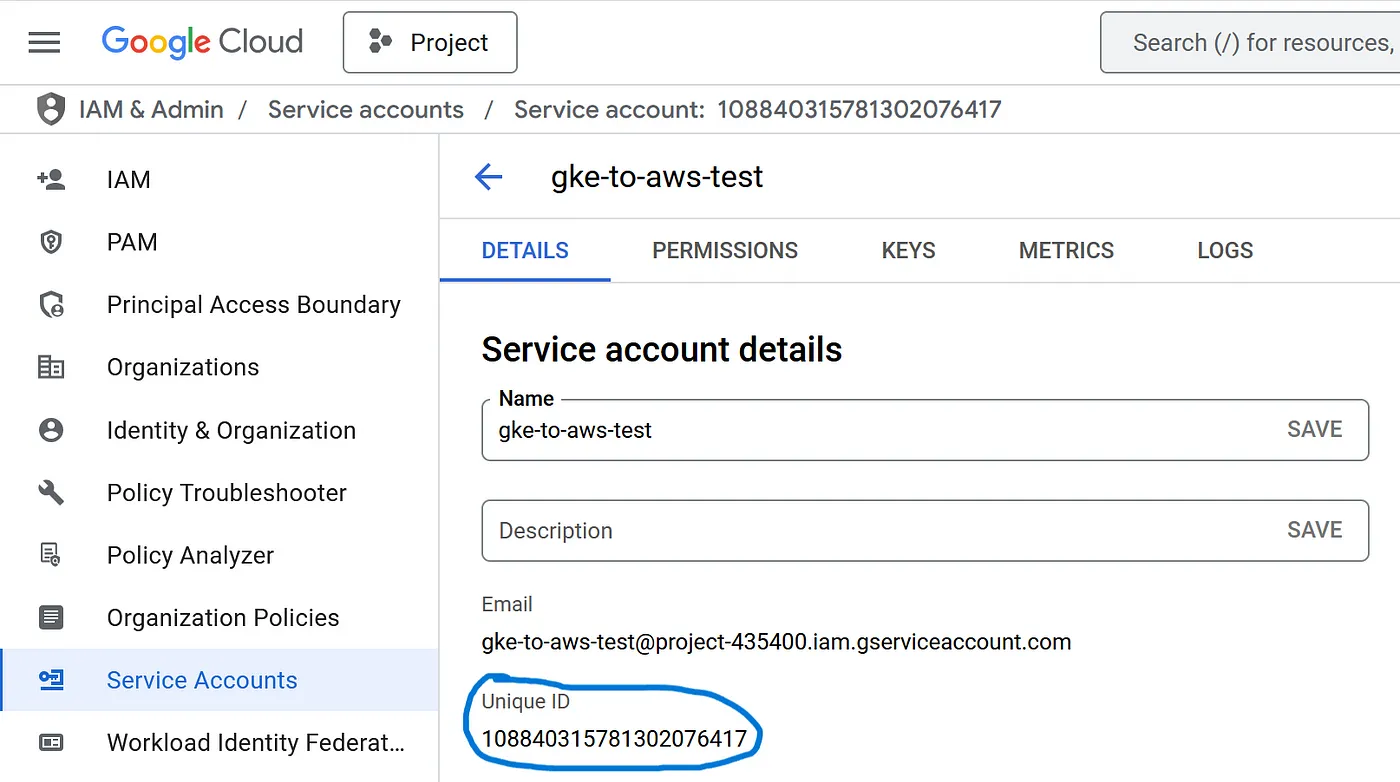
Next we’ll verify that Workload Identity is turned on in our GKE cluster (it is by default with GKE Autopilot here) and what the namespace is (this is the equivalent of an OIDC endpoint with EKS IRSA — but it can be shared by multiple GKE clusters in GCP)
gcloud container clusters list \
  --filter="name:$CLUSTER_NAME" \
  --format="table[box](name, location, workloadIdentityConfig.workloadPool)"
Use below command, If not already enabled
# Enable Workload Identity on your cluster
gcloud container clusters update $CLUSTER_NAME \
  --zone $CLUSTER_ZONE \
  --workload-pool="${PROJECT_ID}.svc.id.goog"
gke-service-account.yaml
apiVersion: v1
kind: ServiceAccount
metadata:
  name: gke-service-account
  namespace: gke-to-aws-test
  annotations:
    iam.gke.io/gcp-service-account: gke-to-aws-test@${PROJECT_ID}.iam.gserviceaccount.com
kubectl apply -f gke-service-account.yaml
You must bind your Kubernetes service account (KSA) to the GSA using IAM
gcloud iam service-accounts add-iam-policy-binding gke-to-aws-test@${PROJECT_ID}.iam.gserviceaccount.com \
--role roles/iam.workloadIdentityUser \
--member "serviceAccount:${PROJECT_ID}.svc.id.goog[gke-to-aws-test/gke-service-account]"
GCP IAM Service Account access to an AWS IAM Role
The neat thing here is that Google Cloud Identities, including IAM Service Accounts, are all OIDC-based — and can get a JSON Web Token (JWT) by just curling a particular endpoint.
If I kubectl exec into a Pod with this service account and run the following curl against the metadata endpoint I get an accounts.google.com jwt back!
kubectl exec -it <pod_name> -n gke-to-aws-test -- /bin/bash

curl -sH "Metadata-Flavor: Google" "http://metadata/computeMetadata/v1/instance/service-accounts/default/identity?audience=<update with the GSA unique id from previous steps>&format=full&licenses=FALSE"
And if I go to https://jwt.io and paste it in I can decode that. In the payload you’ll see the audience (aud) is the unique ID of our GCP IAM service account and the email is its full ID.
For our last trick, you can just give this jwt straight to AWS Simple Token Service (STS) and assume an AWS IAM Role with it!
AWS
Create a AWS IAM role named:- gke-to-aws-test. And add the below Trust-policy to it.
Trust relationships:-
{
  "Version": "2012-10-17",
  "Statement": [
    {
      "Effect": "Allow",
      "Principal": {
          "Federated": "accounts.google.com"
      },
      "Action": "sts:AssumeRoleWithWebIdentity",
      "Condition": {
          "StringEquals": {
              "accounts.google.com:aud": "<update with the Google Service Account Unique_id>"
          }
      }
    }
  ]
}
And add the relevant AWS Service Policy to this role, which you want access to. In this case, I am going to use S3.
Now all we need to do is just pass this jwt that we curled from inside our Pod to AWS STS via the AWS CLI. We can do that end-to-end with this script:
GCP_OAUTH_AUD="<update with the Google Service Account Unique_id>"
AWS_ROLE_ARN="arn:aws:iam::<AWS Account ID>:role/gke-to-aws-test"

# Get OIDC token from GCP metadata
jwt_token=$(curl -s -H "Metadata-Flavor: Google" \
  "http://metadata.google.internal/computeMetadata/v1/instance/service-accounts/default/identity?audience=${GCP_OAUTH_AUD}&format=full")

# Confirm token is not empty
if [[ -z "$jwt_token" ]]; then
  echo "❌ Failed to fetch OIDC token from metadata service"
  exit 1
fi

# Assume role using the token
credentials=$(aws sts assume-role-with-web-identity \
  --role-arn "$AWS_ROLE_ARN" \
  --role-session-name "$GCP_OAUTH_AUD" \
  --web-identity-token "$jwt_token" \
  | jq '.Credentials | .Version=1')

echo "$credentials"
And I’ll get back the required AWS token to be that role from STS. But now I need to feed that to the AWS CLI and SDK to use somehow.
For that, I can tell the AWS CLI and SDKs to run that script for me every time I want to call AWS by specifying the
credential_processparameter in the~/.aws/configfile.
And I can even mount both that script and the AWS config file into my Pod at runtime via ConfigMaps too — and then any AWS CLI or SDK commands will just work out-of-the-box without changing the container image! Note that the AWS CLI will need to be in the container image for this to work (as the script needs to run the aws sts CLI) — but if that is an issue you could move this approach to a sidecar within the Pod fairly easily as well.
apiVersion: v1
kind: ConfigMap
metadata:
  name: credentials-sh
  namespace: gke-to-aws-test
data:
  credentials.sh: |-
    #!/bin/bash
    GCP_OAUTH_AUD="<update with the Google Service Account Unique_id>"
    AWS_ROLE_ARN="arn:aws:iam::<AWS Account ID>:role/gke-to-aws-test"
    yum install jq -y &> /dev/null

    # Get OIDC token from GCP metadata
    jwt_token=$(curl -s -H "Metadata-Flavor: Google" \
    "http://metadata.google.internal/computeMetadata/v1/instance/service-accounts/default/identity?audience=${GCP_OAUTH_AUD}&format=full")

    # Confirm token is not empty
    if [[ -z "$jwt_token" ]]; then
    echo "❌ Failed to fetch OIDC token from metadata service"
    exit 1
    fi

    # Assume role using the token
    credentials=$(aws sts assume-role-with-web-identity \
    --role-arn "$AWS_ROLE_ARN" \
    --role-session-name "$GCP_OAUTH_AUD" \
    --web-identity-token "$jwt_token" \
    | jq '.Credentials | .Version=1')

    echo "$credentials"
---
apiVersion: v1
kind: ConfigMap
metadata:
  name: aws-config
  namespace: gke-to-aws-test
data:
  config: |-
    [default]
    credential_process = /root/credentials.sh
    [profile credentials_script]
---
apiVersion: v1
kind: Pod
metadata:
  name: awscli
  namespace: gke-to-aws-test
spec:
  serviceAccount: gke-service-account
  containers:
    - name: awscli
      image: amazon/aws-cli:latest
      # Just spin & wait forever so we can kubectl exec in
      command: ["/bin/bash", "-c", "--"]
      args: ["while true; do sleep 30; done;"]
      volumeMounts:
        - name: credentials-sh
          mountPath: /root
        - name: aws-config
          mountPath: /root/.aws
      env:
        - name: GCP_OAUTH_AUD
          value: "<UNIQUE ID>"
        - name: AWS_ROLE_ARN
          value: "arn:aws:iam::<AWS Account ID>:role/gke-to-aws-test"
  volumes:
    - name: credentials-sh
      configMap:
        name: credentials-sh
        defaultMode: 0777
        items:
          - key: credentials.sh
            path: credentials.sh
    - name: aws-config
      configMap:
        name: aws-config
        items:
          - key: config
            path: config