Context
Our client needs to use SAP HANA Cloud Private Edition for their operations. The SAP team suggested that, regardless of the cloud platform we use, they would deploy their application in their own tenancy and grant us access.
Problem Statement
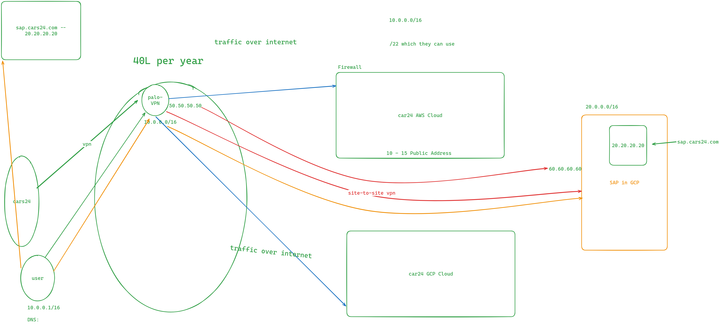
Take a look at the diagram below: we have the SAP in GCP section, where the SAP team will create a project and deploy their services.
Since this setup is hosted in the cloud, accessing the resources must be secure, such as through a VPN.
We’ve been using Palo Alto as our VPN solution. Users connect to Palo Alto, and all VPN IPs are whitelisted in our firewall to securely access the services.
“Can you make your endpoint accessible to Palo Alto IPs?”
However, their response was firm:
“We cannot make it public; it has to remain private.”
Exploring Alternatives
Next, we consulted with the Palo Alto team to explore the possibility of a site-to-site VPN between our Palo Alto environment and the SAP environment.
Here’s what they quoted:
- 40 Lac INR for the site-to-site VPN setup.
- Additional yearly cost for the VPN license (supporting 200–250 users). This was far too expensive for our requirements.
Moving Forward
Given the high cost of this solution, we decided to explore more cost-effective and efficient alternatives.
We wanted a solution that ensured security without incurring such a significant expense.
SAP HANA Cloud Private Edition is available on both AWS and GCP. The choice of cloud provider depends on the client’s preference and comfort level.
Solution 1: Leveraging GCP
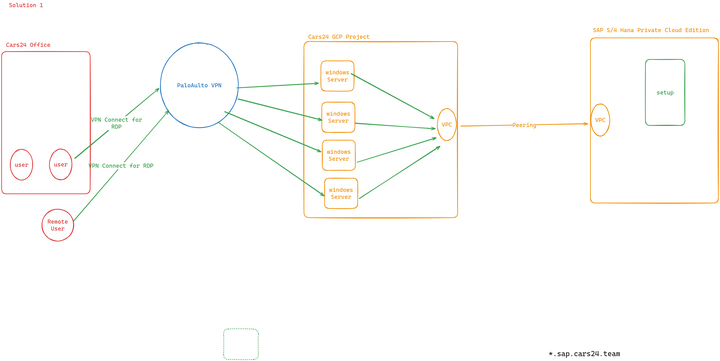
In the previous setup, we relied solely on Palo Alto for connectivity, without utilizing any GCP-related resources.
We proposed the following solution:
- Establish Connectivity: SAP will deploy their Private Edition in GCP, and we will connect our environment to theirs using one of the following options:
- VPC Peering
- Direct Connect
- Site-to-Site VPN
- Implement VPC Peering:
- Create a GCP project on our side.
- Establish
VPC Peeringbetween our environment and SAP’s environment in GCP.
- Retain Palo Alto for VPN:
- Continue using Palo Alto as our VPN solution for on-premises and remote users.
- Deploy Windows Servers:
- Set up four Windows servers.
- Users will connect via RDP (Remote Desktop Protocol) using their accounts.
- Through these servers, users will securely access SAP services.
Rationale for Four Windows Servers
- We need to accommodate 200 users.
- RDP licensing requires us to buy licenses for each user.
- Each server will be configured with 50 RDP licenses, so we’ll deploy four servers to meet the demand.
Cost Involved
Breakdown of Costs:
- RDP Licenses:
- 1 RDP license is around 11,000 INR
- Total: 11000 * 200 = 22 lac approx
- Windows Servers:
- Four servers with 8 vCPUs and 32 GB RAM each.
- Monthly cost: $500 × 4 = $2,000 (approx 1,68,164 INR)
Solution 2: Using Netbird as a Self-Hosted VPN
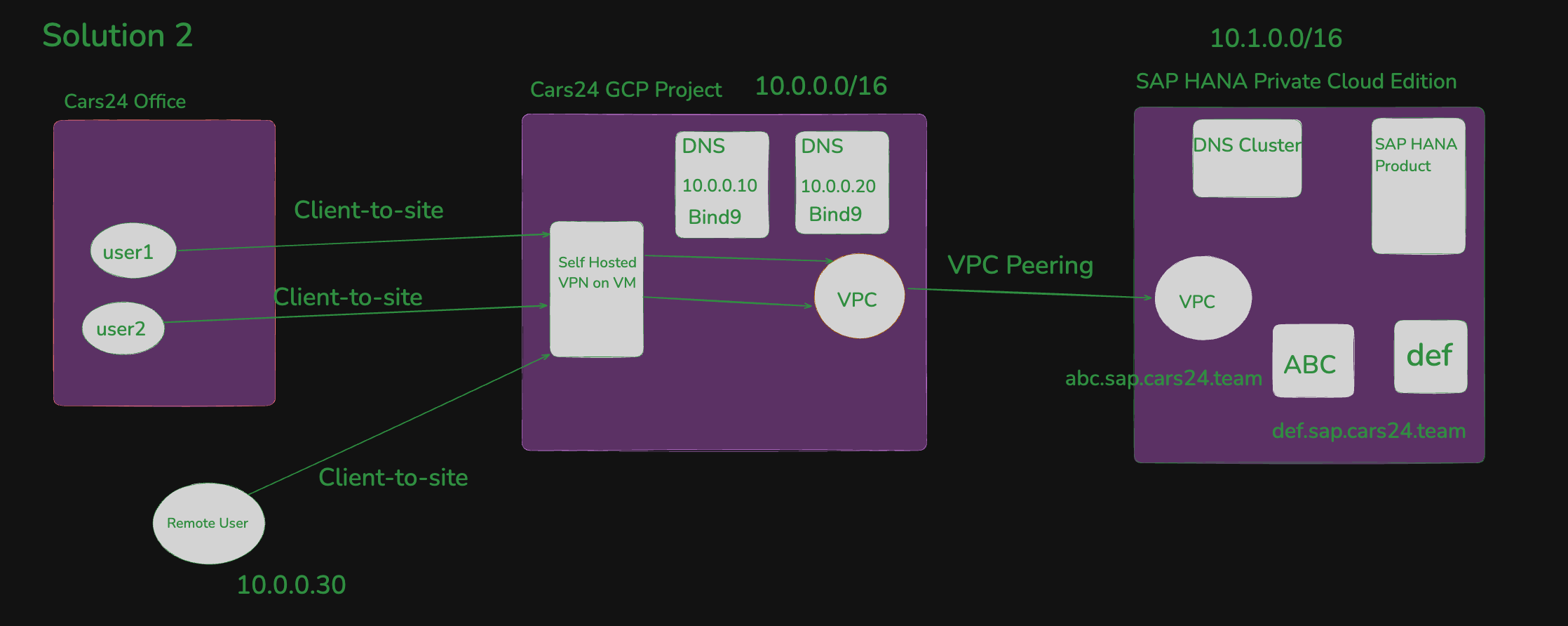
We’ll retain the same GCP setup as outlined in Solution 1, but instead of using Palo Alto, we will switch to Netbird as our self-hosted VPN solution. This VPN will be deployed on a Linux machine within our GCP project.
Setup Overview
- User Access:
- Users, whether in the office or working remotely, will connect to the self-hosted VPN using Google SSO (Single Sign-On).
- Once connected, they will gain secure access to SAP S/4HANA to perform their tasks.
- Hosting Environment:
- The VPN will be hosted on a Linux machine in our GCP project.
Visual Representation
Check the diagram below for a clearer understanding of this solution:
Cost Involved
Breakdown of Costs:
The only recurring cost is the server hosting the VPN:
- 1 Linux Server with VPN installed - 16 cpu / 32GB RAM (This is MAX)
- Total: $294.28 (24743.70) per month