🛡️ Setting Up a High Availability (HA) PostgreSQL Cluster with Patroni, etcd, and HAProxy
Setting up a High Availability (HA) cluster for PostgreSQL typically involves configuring multiple nodes to ensure data availability and reliability. There are various ways to achieve this, in this tutorial I deploy 3 PostgreSQL nodes with Patroni for HA setting up etcd for consensus, and using HAProxy to manage client connections.
Patroni is a Python tool used for deploying and managing high-availability (HA) PostgreSQL clusters. It facilitates failover management, replication, and cluster management by leveraging distributed configuration stores like etcd, Consul, or ZooKeeper. Patroni uses PostgreSQL’s streaming replication and hot standby capabilities to simplify the creation and management of HA clusters, especially those requiring read scalability.
Key features and functionalities of Patroni:
- High Availability: Patroni ensures continuous database accessibility by automatically handling failover to a standby node if the primary node fails.
Automatic Failover: Patroni monitors the health of PostgreSQL nodes and automatically switches to a standby node when the primary node becomes unavailable.
Replication: Patroni uses PostgreSQL’s streaming replication to keep standby nodes synchronized with the primary node, ensuring data consistency and availability.
Cluster Management: Patroni provides tools for managing the PostgreSQL cluster, including adding, removing, and restarting nodes.
Load Balancing: Patroni can be integrated with load balancers like HAProxy and Keepalived to distribute client connections across the cluster nodes, optimizing performance and availability.
Backup and Recovery: Patroni integrates with tools like PgBackRest for backup and recovery operations, ensuring data protection and disaster recovery.
How Patroni works:
1. Distributed Configuration Store: Patroni relies on a distributed configuration store (like etcd, Consul, or ZooKeeper) to store the cluster configuration, including node status, replication settings, and other relevant parameters.
2. Patroni Agents: Each PostgreSQL node in the cluster has a Patroni agent that monitors its own health and interacts with the distributed configuration store.
3. Failover Detection: When a node fails, the Patroni agents in the other nodes detect the failure and initiate failover procedures.
4. Failover Execution: Patroni uses the distributed configuration store to promote a standby node to become the new primary node, ensuring minimal downtime.
5. Cluster Management: Patroni provides tools for managing the cluster, including adding, removing, and restarting nodes.
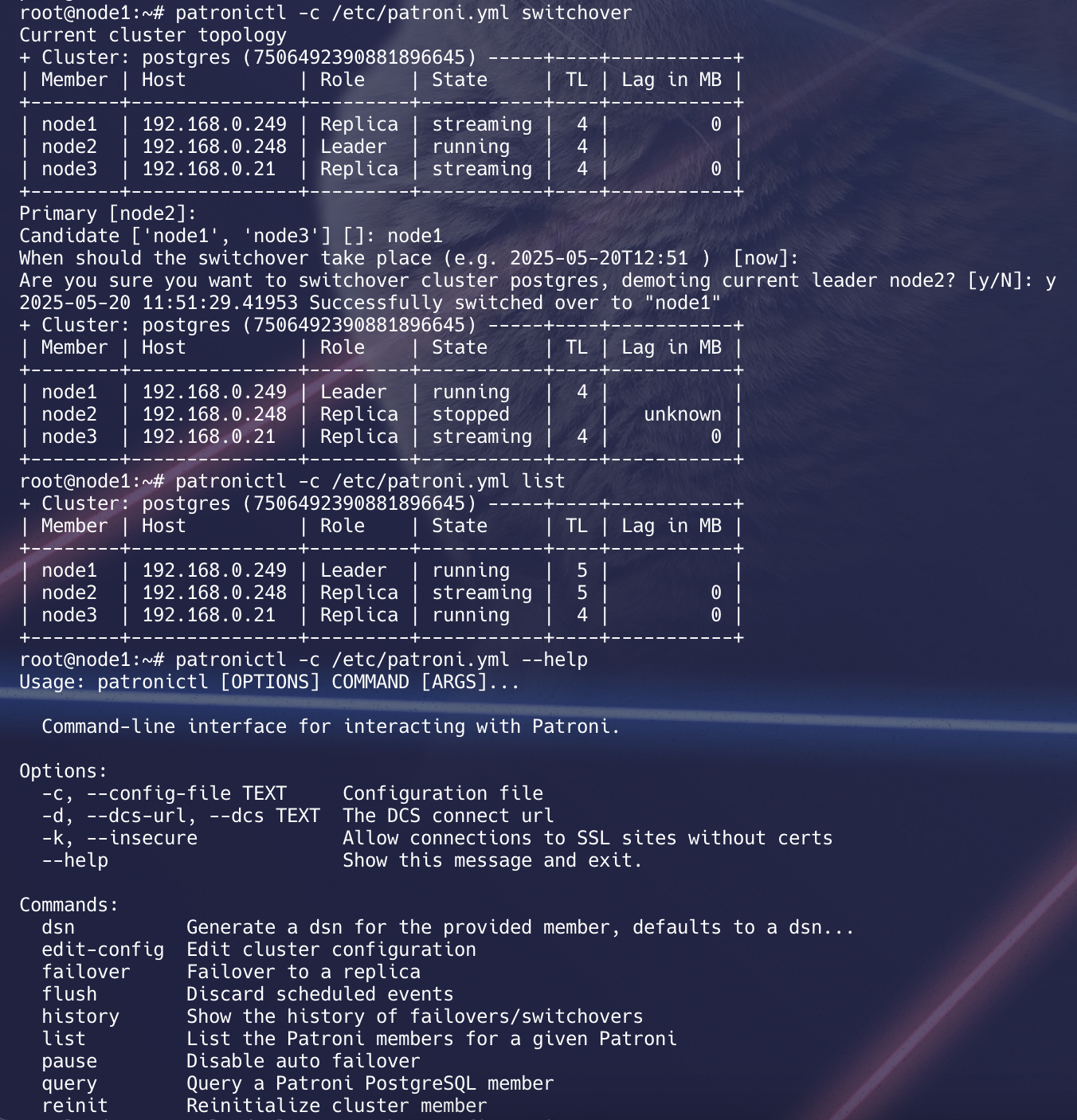
The need for shared storage in a PostgreSQL high availability (HA) cluster depends on the specific architecture and requirements of your deployment. PostgreSQL itself doesn’t require shared storage for a basic HA setup, but shared storage might be beneficial for certain configurations. Here are some considerations:
⚠️ Important Architectural Consideration
To achieve true high availability, you must avoid any single points of failure. This setup includes:
- Three etcd nodes (for quorum-based consensus and fault tolerance)
- Two HAProxy nodes (active/passive with VIP managed by Keepalived)
✅ This ensures no single point of failure in either the consensus layer (etcd) or the client connection layer (HAProxy).
🧠 Shared Storage Considerations
Local Disks:
Advantages:
-
Simplicity: Setting up a PostgreSQL cluster with local disks is usually simpler and easier to manage.
-
Cost: Local disks are often more cost-effective, especially in smaller deployments.
Considerations:
- Data Replication: If you are using tools like Patroni for HA, each node typically manages its own local copy of the database. Replication mechanisms are used to keep the data in sync between nodes.
Use Cases:
-
Small to medium-sized deployments.
-
When simplicity and cost are critical factors.
Shared Storage:
Advantages:
- Shared Data: Shared storage allows multiple nodes to access the same data. This can simplify data consistency and reduce the need for complex replication mechanisms.
Considerations:
-
Complexity: Setting up and maintaining shared storage can be more complex, requiring additional configuration and management.
-
Cost: Shared storage solutions can be more expensive than local disks.
Use Cases:
-
Large-scale deployments where data consistency and central management are critical.
-
When shared storage is already part of the existing infrastructure.
Hybrid Approaches:
Advantages:
- Flexibility: You can use a combination of local storage and shared storage to balance cost, complexity, and performance.
Considerations:
- Data Distribution: Carefully plan how data is distributed and replicated between nodes to ensure high availability.
Use Cases:
- Deployments with specific requirements that benefit from a hybrid approach.
✅ Prerequisites:
This setup uses AWS EC2 (Ubuntu 24.04 minimal) with PostgreSQL 16 and t2.medium instances.
-
3 postgresql cluster node -
1 etcd host -
1 haproxy host
Infrastructure Layout:
| Node | Component | IP Address |
|---|---|---|
| node1 | PostgreSQL, Patroni | 192.168.0.249 |
| node2 | PostgreSQL, Patroni | 192.168.0.248 |
| node3 | PostgreSQL, Patroni | 192.168.0.21 |
| node4 | etcd Database | 192.168.0.179 |
| node5 | HAProxy | 192.168.0.173 |
Steps:
1. Update all nodes
sudo apt update
2. Update /etc/hosts on all nodes:
192.168.0.249  node1
192.168.0.248  node2
192.168.0.21   node3
192.168.0.179  node4
192.168.0.173   haproxy
3. Install postgresql server software on node1,node2 and node3. Also stop postgresql service after installation:
apt install postgresql postgresql-contrib -y
systemctl stop postgresql
systemctl status postgresql
4. Create a symlink on all 3 nodes between /usr/lib/postgresql/16/bin/ and /usr/sbin for patroni requirement:
sudo ln -s /usr/lib/postgresql/16/bin/* /usr/sbin
5. Install patroni on node1,node2,node3
sudo apt -y install python3-pip python3-dev libpq-dev
pip3 install --upgrade pip
sudo pip install patroni --break-system-packages
sudo pip install python-etcd --break-system-packages
sudo pip install psycopg2 --break-system-packages
6. Install etcd on node4
As of
Ubuntu 18.04, the etcd package is no longer available from the default repository. To install successfully, enable the Universe repository on Ubuntu.Ubuntu 22.04,
sudo apt -y install etcd
As for Ubuntu 24.04 install the package with following name:
sudo apt update
apt install etcd-server
7. Install haproxy on node named as haproxy
sudo apt -y install haproxy
8. Configuration of etcd:
- Edit etcd config file / add below on /etc/default/etcd
ETCD_LISTEN_PEER_URLS  =  "http://192.168.0.179:2380,http://192.168.0.179:7001"
ETCD_LISTEN_CLIENT_URLS  =  "http://127.0.0.1:2379, http://192.168.0.179:3379, http://192.168.0.179:2379"
ETCD_INITIAL_ADVERTISE_PEER_URLS  =  "http://192.168.0.179:2380"
ETCD_INITIAL_CLUSTER  =  "etcd0=http://192.168.0.179:2380"
ETCD_ADVERTISE_CLIENT_URLS  =  "http://192.168.0.179:2379"
ETCD_INITIAL_CLUSTER_TOKEN  =  "node1"
ETCD_INITIAL_CLUSTER_STATE  =  "new"
DAEMON_ARGS = "--enable-v2=true"
we have used
DAEMON_ARGS="--enable-v2=true"Patroni is trying to talk toetcd v2 API, but etcd is running version3.4.30, which: Disables the v2 API by default Responds with a 404 for any /v2/… endpoint
If you wanna setup etcd cluster in HA instead of just 1 etcd node follow the below guide
sudo systemctl daemon-reexec
sudo systemctl daemon-reload
systemctl enable etcd
sudo systemctl restart etcd
sudo systemctl status etcd
Verify that v2 API is working:
curl http://192.168.0.179:2379/v2/keys
You should get a valid response (likely an empty JSON or directory listing), not a 404.
{"action":"get","node":{"dir":true,"nodes":[{"key":"/db","dir":true,"modifiedIndex":7,"createdIndex":7}]}}
9. Configuration of patroni on node1:
- Create
/etc/patroni.ymland add below lines topatroni.yml
scope: postgres
namespace: /db/
name: node1

restapi:
  listen: 192.168.0.249:8008
  connect_address: 192.168.0.249:8008
  authentication:
    username: patroni
    password: Strong@RestAuth123!

etcd3:
  hosts: 192.168.0.179:2379

watchdog:
  mode: automatic
  device: /dev/watchdog
  safety_margin: 5

bootstrap:
  dcs:
    ttl: 15
    loop_wait: 5
    retry_timeout: 10
    maximum_lag_on_failover: 1048576
    synchronous_mode: true
    synchronous_node_count: 2
    postgresql:
      use_pg_rewind: true
  initdb:
    - encoding: UTF8
    - data-checksums
  pg_hba:
    - host replication replicator 127.0.0.1/32 md5
    - host replication replicator 192.168.0.0/24 md5
    - host all all 192.168.0.0/24 md5
  users:
    admin:
      password: admin
      options:
        - createrole
        - createdb

postgresql:
  listen: 192.168.0.249:5432
  connect_address: 192.168.0.249:5432
  data_dir: /data/patroni
  pgpass: /tmp/pgpass
  authentication:
    replication:
      username: replicator
      password: "A1qaz2wsx3edc"
    superuser:
      username: postgres
      password: "B1qaz2wsx3edc"
  parameters:
    unix_socket_directories: '.'
    wal_level: replica
    hot_standby: on
    max_wal_senders: 10
    wal_keep_size: 64
    archive_mode: 'on'
    archive_command: 'cp %p /var/lib/postgresql/wal_archive/%f'
    log_destination: 'stderr'
    logging_collector: 'on'
    log_directory: 'pg_log'
    log_filename: 'postgresql-%a.log'
    log_rotation_age: '1d'
    log_rotation_size: '100MB'

tags:
  nofailover: false
  noloadbalance: false
  clonefrom: false
  nosync: false
10. Configuration of patroni on node2:
- Create /etc/patroni.yml and add below lines to patroni.yml
scope: postgres
namespace: /db/
name: node2
restapi:
  listen: 192.168.0.248:8008
  connect_address: 192.168.0.248:8008
  authentication:
    username: patroni
    password: Strong@RestAuth123!
etcd3:
  hosts: 192.168.0.179:2379
watchdog:
  mode: automatic
  device: /dev/watchdog
  safety_margin: 5
# bootstrap:
#   dcs:
#     ttl: 15
#     loop_wait: 5
#     retry_timeout: 10
#     maximum_lag_on_failover: 1048576
#     synchronous_mode: true
#     synchronous_node_count: 2
#     postgresql:
#       use_pg_rewind: true
#   initdb:
#     - encoding: UTF8
#     - data-checksums
#   pg_hba:
#     - host replication replicator 127.0.0.1/32 md5
#     - host replication replicator 192.168.0.0/24 md5
#     - host all all 192.168.0.0/24 md5
#   users:
#     admin:
#        password: admin
#        options:
#        - createrole
#        - createdb
postgresql:
  listen: 192.168.0.248:5432
  connect_address: 192.168.0.248:5432
  data_dir: /data/patroni
  pgpass: /tmp/pgpass
  authentication:
    replication:
      username: replicator
      password: "A1qaz2wsx3edc"
    superuser:
      username: postgres
      password: "B1qaz2wsx3edc"
  parameters:
    unix_socket_directories: '.'
    wal_level: replica
    hot_standby: on
    max_wal_senders: 10
    wal_keep_size: 64
    archive_mode: 'on'
    archive_command: 'cp %p /var/lib/postgresql/wal_archive/%f'
    log_destination: 'stderr'
    logging_collector: 'on'
    log_directory: 'pg_log'
    log_filename: 'postgresql-%a.log'
    log_rotation_age: '1d'
    log_rotation_size: '100MB'
tags:
   nofailover:   false
   noloadbalance:   false
   clonefrom:   false
   nosync:   false
11. Configuration of patroni on node3:
- Create /etc/patroni.yml and add below lines to patroni.yml
scope: postgres
namespace: /db/
name: node3
restapi:
  listen: 192.168.0.21:8008
  connect_address: 192.168.0.21:8008
  authentication:
    username: patroni
    password: Strong@RestAuth123!
etcd3:
  hosts: 192.168.0.179:2379
watchdog:
  mode: automatic
  device: /dev/watchdog
  safety_margin: 5
# bootstrap:
#   dcs:
#     ttl: 15
#     loop_wait: 5
#     retry_timeout: 10
#     maximum_lag_on_failover: 1048576
#     synchronous_mode: true
#     synchronous_node_count: 2
#     postgresql:
#       use_pg_rewind: true
#   initdb:
#     - encoding: UTF8
#     - data-checksums
#   pg_hba:
#     - host replication replicator 127.0.0.1/32 md5
#     - host replication replicator 192.168.0.0/24 md5
#     - host all all 192.168.0.0/24 md5
  users:
    admin:
       password: admin
       options:
       - createrole
       - createdb
postgresql:
   listen: 192.168.0.21:5432
   connect_address: 192.168.0.21:5432
   data_dir:     /data/patroni
   pgpass:     /tmp/pgpass
   authentication:
    replication:
      username:   replicator
      password:     "A1qaz2wsx3edc"
    superuser:
      username:   postgres
      password:     "B1qaz2wsx3edc"
   parameters:
    unix_socket_directories: '.'
    wal_level: replica
    hot_standby: on
    max_wal_senders: 10
    wal_keep_size: 64
    archive_mode: 'on'
    archive_command: 'cp %p /var/lib/postgresql/wal_archive/%f'
    log_destination: 'stderr'
    logging_collector: 'on'
    log_directory: 'pg_log'
    log_filename: 'postgresql-%a.log'
    log_rotation_age: '1d'
    log_rotation_size: '100MB'
tags:
   nofailover:   false
   noloadbalance:   false
   clonefrom:   false
   nosync:   false
if you are running
etcdas a multi node cluster change the below configs in /etc/patroni.ymlFrom
etcd:
host: 192.168.0.179:2379
etcd3: hosts: 192.168.0.179:2379,192.168.0.60:2379,192.168.0.35:2379
To enable software watchdog issue the following commands as root before starting Patroni:
modprobe softdog
# Replace postgres with the user you will be running patroni under
chown postgres /dev/watchdog
if we use the
bootstarpblock on all nodes running patroni in/etc/patroni.yml, then it is possibleLOG: waiting for WAL to become available at 0/E000040 WARNING: specified neither primary_conninfo nor restore_command HINT: The database server will regularly poll the pg_wal subdirectory to check for files placed there.
Cannot stream WAL from the primary (missing primary_conninfo)
Cannot fetch archived WALs (missing restore_command)
So it is stuck waiting forever for WAL segment 00000001000000000000000E
the problem arises when a
node bootswithout seeingcluster metadata in etcd, or ifbootstrap:is incorrectly triggered again.
To get-rid of this
# Stop Patroni
systemctl stop patroni

# Wipe local data
rm -rf /data/patroni/*

# Start Patroni again
systemctl start patroni

patronictl -c /etc/patroni.yml list
🧠 Prevention Tips
- Ensure Patroni doesn’t hit the
bootstrap:block again after initial cluster creation. Avoid enabling both bootstrap: and initdb: on all nodes. It should run only once, from the initial node that forms the cluster.
12. 📁 Create patroni data directory on node1,node2 and node3:
sudo mkdir -p  /data/patroni
sudo chown postgres:postgres /data/patroni/
sudo chmod 700 /data/patroni/
13. 🔧 Create systemd file for patroni on node1,node2,node3:
vim /etc/systemd/system/patroni.service
[Unit]
Description=Patroni Orchestration
After=syslog.target network.target
[Service]
Type=simple
User=postgres
Group=postgres
ExecStart=/usr/local/bin/patroni /etc/patroni.yml
KillMode=process
TimeoutSec=30
Restart=no
[Install]
WantedBy=multi-user.targ
14. Start only patroni services on node1,node2,node3
sudo systemctl daemon-reload
sudo systemctl start patroni
15. 🧰 Configure HAProxy (node5)
update /etc/haproxy/haproxy.cfg on haproxy node with below lines:
global
      maxconn 100
defaults
      log global
      mode tcp
      retries 2
      timeout client 30m
      timeout connect 4s
      timeout server 30m
      timeout   check   5s
listen stats
      mode http
      bind *:7000
      stats enable
      stats uri /
listen postgres
      bind *:5000
      option httpchk
      http-check expect status 200
      default-server inter 3s fall 3 rise 2 on-marked-down shutdown-sessions
      server node1 192.168.0.249:5432 maxconn 100   check   port 8008
      server node2 192.168.0.248:5432 maxconn 100   check   port 8008
      server node3 192.168.0.21:5432 maxconn 100   check   port 8008
16. Restart haproxy service
sudo systemctl restart haproxy
17. Test stats:
[http://
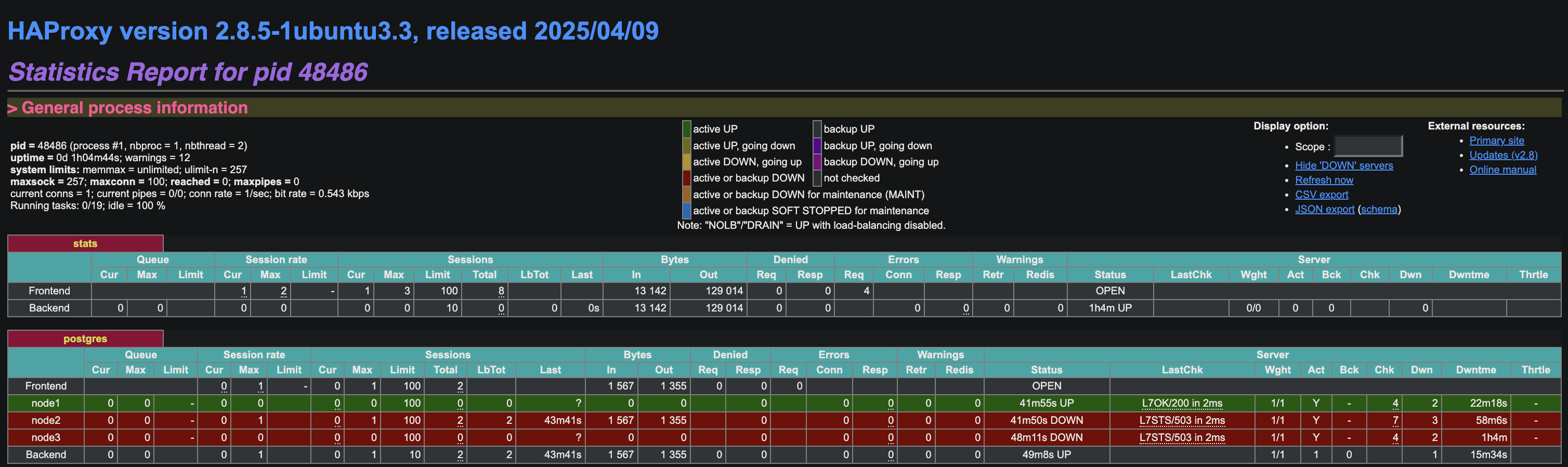
To setup Haproxy HA setup follow the below guide High Availability HAProxy Failover Setup with Keepalived and AWS Elastic IP
18. 🔁 Test Failover
Active node is node1 , let’s stop patroni service on node1 and check failover:
root@node1:~# systemctl stop patroni
root@node1:~# systemctl status patroni
○ patroni.service - Patroni Orchestration
     Loaded: loaded (/etc/systemd/system/patroni.service; disabled; preset: enabled)
     Active: inactive (dead)

May 20 11:47:17 node1 patroni[6417]: 2025-05-20 11:47:17.785 UTC [6417] FATAL:  terminating connection due to administrator command
May 20 11:47:17 node1 patroni[6458]: 2025-05-20 11:47:17.787 UTC [6458] FATAL:  terminating walreceiver process due to administrator command
May 20 11:47:17 node1 patroni[6409]: 2025-05-20 11:47:17.789 UTC [6409] LOG:  shutting down
May 20 11:47:17 node1 patroni[6409]: 2025-05-20 11:47:17.789 UTC [6409] LOG:  restartpoint starting: shutdown immediate
May 20 11:47:17 node1 patroni[6409]: 2025-05-20 11:47:17.813 UTC [6409] LOG:  restartpoint complete: wrote 1 buffers (0.0%); 0 WAL file(s) added, 0 removed, 0 recycled; write=0.003 s,>
May 20 11:47:17 node1 patroni[6409]: 2025-05-20 11:47:17.813 UTC [6409] LOG:  recovery restart point at 0/4000428
May 20 11:47:17 node1 patroni[6408]: 2025-05-20 11:47:17.816 UTC [6408] LOG:  database system is shut down
May 20 11:47:17 node1 systemd[1]: patroni.service: Deactivated successfully.
May 20 11:47:17 node1 systemd[1]: Stopped patroni.service - Patroni Orchestration.
May 20 11:47:17 node1 systemd[1]: patroni.service: Consumed 1.323s CPU time, 68.2M memory peak, 0B memory swap peak.
Check node2
root@node2:~# systemctl status patroni
● patroni.service - Patroni Orchestration
     Loaded: loaded (/etc/systemd/system/patroni.service; disabled; preset: enabled)
     Active: active (running) since Tue 2025-05-20 11:44:53 UTC; 51min ago
   Main PID: 6514 (patroni)
      Tasks: 15 (limit: 4674)
     Memory: 120.7M (peak: 121.4M)
        CPU: 5.210s
     CGroup: /system.slice/patroni.service
             ├─6514 /usr/bin/python3 /usr/local/bin/patroni /etc/patroni.yml
             ├─6735 postgres -D /data/patroni --config-file=/data/patroni/postgresql.conf --listen_addresses=192.168.0.248 --port=5432 --cluster_name=postgres --wal_level=replica --ho>
             ├─6737 "postgres: postgres: checkpointer "
             ├─6738 "postgres: postgres: background writer "
             ├─6746 "postgres: postgres: postgres postgres 192.168.0.248(50688) idle"
             ├─6747 "postgres: postgres: postgres postgres 192.168.0.248(50700) idle"
             ├─7747 "postgres: postgres: walwriter "
             ├─7748 "postgres: postgres: autovacuum launcher "
             ├─7749 "postgres: postgres: logical replication launcher "
             └─7750 "postgres: postgres: walsender replicator 192.168.0.21(39284) streaming 0/404DF60"

May 20 12:36:09 node2 patroni[6514]: 2025-05-20 12:36:09,270 INFO: promoted self to leader by acquiring session lock
May 20 12:36:09 node2 patroni[6739]: 2025-05-20 12:36:09.271 UTC [6739] LOG:  received promote request
May 20 12:36:09 node2 patroni[6739]: 2025-05-20 12:36:09.271 UTC [6739] LOG:  redo done at 0/404DDD0 system usage: CPU: user: 0.00 s, system: 0.00 s, elapsed: 2678.31 s
May 20 12:36:09 node2 patroni[6739]: 2025-05-20 12:36:09.271 UTC [6739] LOG:  last completed transaction was at log time 2025-05-20 11:51:58.659107+00
May 20 12:36:09 node2 patroni[6739]: 2025-05-20 12:36:09.277 UTC [6739] LOG:  selected new timeline ID: 6
May 20 12:36:09 node2 patroni[6739]: 2025-05-20 12:36:09.330 UTC [6739] LOG:  archive recovery complete
May 20 12:36:09 node2 patroni[6737]: 2025-05-20 12:36:09.339 UTC [6737] LOG:  checkpoint starting: force
May 20 12:36:09 node2 patroni[6735]: 2025-05-20 12:36:09.341 UTC [6735] LOG:  database system is ready to accept connections
May 20 12:36:09 node2 patroni[6737]: 2025-05-20 12:36:09.362 UTC [6737] LOG:  checkpoint complete: wrote 2 buffers (0.0%); 0 WAL file(s) added, 0 removed, 0 recycled; write=0.005 s, s>
May 20 12:36:10 node2 patroni[6514]: 2025-05-20 12:36:10,292 INFO: no action. I am (node2), the leader with the lock
check node3
root@node3:~# systemctl status patroni
● patroni.service - Patroni Orchestration
     Loaded: loaded (/etc/systemd/system/patroni.service; disabled; preset: enabled)
     Active: active (running) since Tue 2025-05-20 11:45:09 UTC; 51min ago
   Main PID: 6521 (patroni)
      Tasks: 13 (limit: 4674)
     Memory: 103.0M (peak: 105.0M)
        CPU: 4.679s
     CGroup: /system.slice/patroni.service
             ├─6521 /usr/bin/python3 /usr/local/bin/patroni /etc/patroni.yml
             ├─6535 postgres -D /data/patroni --config-file=/data/patroni/postgresql.conf --listen_addresses=192.168.0.21 --port=5432 --cluster_name=postgres --wal_level=replica --hot>
             ├─6537 "postgres: postgres: checkpointer "
             ├─6538 "postgres: postgres: background writer "
             ├─6539 "postgres: postgres: startup recovering 000000060000000000000004"
             ├─6546 "postgres: postgres: postgres postgres 192.168.0.21(60018) idle"
             ├─6547 "postgres: postgres: postgres postgres 192.168.0.21(60020) idle"
             └─7677 "postgres: postgres: walreceiver streaming 0/404DF60"

May 20 12:36:09 node3 patroni[6539]: 2025-05-20 12:36:09.348 UTC [6539] LOG:  new target timeline is 6
May 20 12:36:09 node3 patroni[7677]: 2025-05-20 12:36:09.367 UTC [7677] LOG:  started streaming WAL from primary at 0/4000000 on timeline 6
May 20 12:36:10 node3 patroni[6521]: 2025-05-20 12:36:10,301 INFO: no action. I am (node3), a secondary, and following a leader (node2)
May 20 12:36:12 node3 patroni[6537]: 2025-05-20 12:36:12.276 UTC [6537] LOG:  restartpoint starting: time
May 20 12:36:12 node3 patroni[6537]: 2025-05-20 12:36:12.292 UTC [6537] LOG:  restartpoint complete: wrote 0 buffers (0.0%); 0 WAL file(s) added, 0 removed, 0 recycled; write=0.001 s,>
May 20 12:36:12 node3 patroni[6537]: 2025-05-20 12:36:12.292 UTC [6537] LOG:  recovery restart point at 0/404DE78
May 20 12:36:12 node3 patroni[6537]: 2025-05-20 12:36:12.292 UTC [6537] DETAIL:  Last completed transaction was at log time 2025-05-20 11:51:58.659107+00.
May 20 12:36:20 node3 patroni[6521]: 2025-05-20 12:36:20,299 INFO: no action. I am (node3), a secondary, and following a leader (node2)
May 20 12:36:30 node3 patroni[6521]: 2025-05-20 12:36:30,299 INFO: no action. I am (node3), a secondary, and following a leader (node2)
May 20 12:36:40 node3 patroni[6521]: 2025-05-20 12:36:40,299 INFO: no action. I am (node3), a secondary, and following a leader (node2)
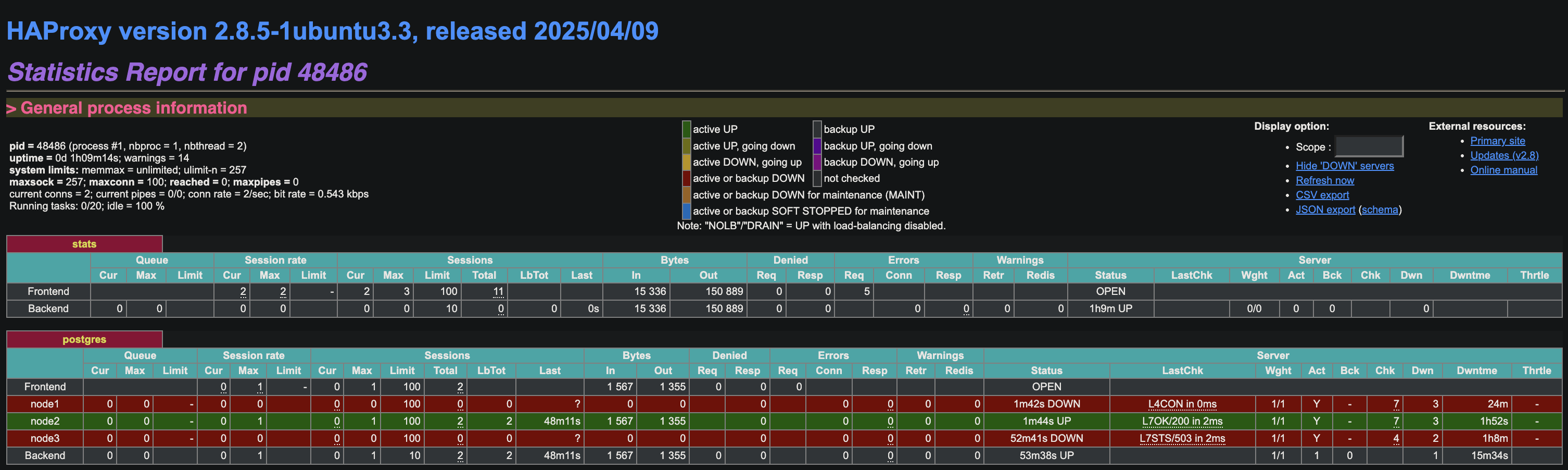
19. Now the new leader is node2:
20. Start patroni service on node1 and check with patroni list command:
systemctl start patroni
root@node1:~# patronictl -c /etc/patroni.yml list

+ Cluster: postgres (7506492390881896645) -----+----+-----------+
| Member | Host          | Role    | State     | TL | Lag in MB |
+--------+---------------+---------+-----------+----+-----------+
| node1  | 192.168.0.249 | Replica | streaming |  6 |         0 |
| node2  | 192.168.0.248 | Leader  | running   |  6 |           |
| node3  | 192.168.0.21  | Replica | streaming |  6 |         0 |
+--------+---------------+---------+-----------+----+-----------+
21. Connect postgres database from haproxy on node1:
psql -h haproxy -p 5000 -U postgres
psql -h 192.168.0.173 -p 5000 -U postgres

Password for user postgres:
psql (16.8 (Ubuntu 16.8-0ubuntu0.24.04.1))
Type "help" for help.

postgres=# \dt;
Did not find any relations.
postgres=# \l
                                                   List of databases
   Name    |  Owner   | Encoding | Locale Provider | Collate |  Ctype  | ICU Locale | ICU Rules |   Access privileges
-----------+----------+----------+-----------------+---------+---------+------------+-----------+-----------------------
 postgres  | postgres | UTF8     | libc            | C.UTF-8 | C.UTF-8 |            |           |
 template0 | postgres | UTF8     | libc            | C.UTF-8 | C.UTF-8 |            |           | =c/postgres          +
           |          |          |                 |         |         |            |           | postgres=CTc/postgres
 template1 | postgres | UTF8     | libc            | C.UTF-8 | C.UTF-8 |            |           | =c/postgres          +
           |          |          |                 |         |         |            |           | postgres=CTc/postgres
(3 rows)
22. 🔄 Switchover Test
Initiate a switchover, which gracefully switches the roles of the current primary and a selected secondary. This is a controlled operation
root@node1:~# patronictl -c /etc/patroni.yml switchover

Current cluster topology
+ Cluster: postgres (7506492390881896645) -----+----+-----------+
| Member | Host          | Role    | State     | TL | Lag in MB |
+--------+---------------+---------+-----------+----+-----------+
| node1  | 192.168.0.249 | Replica | streaming |  6 |         0 |
| node2  | 192.168.0.248 | Leader  | running   |  6 |           |
| node3  | 192.168.0.21  | Replica | streaming |  6 |         0 |
+--------+---------------+---------+-----------+----+-----------+
Primary [node2]:
Candidate ['node1', 'node3'] []: node1
When should the switchover take place (e.g. 2025-05-20T13:43 )  [now]:
Are you sure you want to switchover cluster postgres, demoting current leader node2? [y/N]: y
2025-05-20 12:43:59.79948 Successfully switched over to "node1"
+ Cluster: postgres (7506492390881896645) -----+----+-----------+
| Member | Host          | Role    | State     | TL | Lag in MB |
+--------+---------------+---------+-----------+----+-----------+
| node1  | 192.168.0.249 | Leader  | running   |  6 |           |
| node2  | 192.168.0.248 | Replica | stopped   |    |   unknown |
| node3  | 192.168.0.21  | Replica | streaming |  6 |         0 |
+--------+---------------+---------+-----------+----+-----------+

root@node1:~# patronictl -c /etc/patroni.yml list
+ Cluster: postgres (7506492390881896645) -----+----+-----------+
| Member | Host          | Role    | State     | TL | Lag in MB |
+--------+---------------+---------+-----------+----+-----------+
| node1  | 192.168.0.249 | Leader  | running   |  7 |           |
| node2  | 192.168.0.248 | Replica | streaming |  7 |         0 |
| node3  | 192.168.0.21  | Replica | streaming |  7 |         0 |
+--------+---------------+---------+-----------+----+-----------+
Patroni Restapis:-
curl -s http://192.168.0.248:8008/cluster|jq .
curl -s http://192.168.0.248:8008/patroni | jq .
curl -s http://192.168.0.248:8008/metrics
curl -s http://192.168.0.248:8008/history |jq .
curl -s http://192.168.0.248:8008/config |jq .
# View Etcd Keys Used by Patroni

curl http://192.168.0.179:2379/v2/keys/?recursive=true | jq


# List All v3 Keys (Useful for debugging)

ETCDCTL_API=3 etcdctl \
  --endpoints=http://192.168.0.179:2379 \
  get '' --prefix --keys-only

ETCDCTL_API=3 etcdctl \
  --endpoints=http://192.168.0.179:2379,http://192.168.0.60:2379,http://192.168.0.35:2379 \
  get /db/postgres/leader --prefix


curl -s http://192.168.0.179:2379/v3/kv/range \
  -X POST \
  -H "Content-Type: application/json" \
  -d '{
    "key": "'$(echo -n "/db/postgres/leader" | base64)'"
  }' | jq -r '.kvs[0].value' | base64 -d
✅ Conclusion
- Patroni ensures HA by monitoring nodes and promoting replicas as needed
- etcd provides distributed consensus
- HAProxy routes clients to the active primary
Patroni does not handle logical replication directly—it’s provided by PostgreSQL.