🔐 GitHub Secrets Scanner
An end-to-end automated system that scans GitHub repositories for leaked secrets (like AWS keys, Slack tokens, private keys, etc.) on every code push. When a secret is detected, it sends a real-time email alert and logs the finding into a Kafka topic.
Built for developers, security engineers, and platform teams who want early warnings about leaked credentials in their GitHub workflows.
🚀 Features
- ✅ GitHub webhook integration (triggered on push)
- 🔍 TruffleHog v3-based secrets scanning (filesystem mode)
- 🔁 Kafka integration for streaming findings
- 📩 Email alerts (SMTP-based) on detection
- 🧪 Fully testable with real GitHub repos and dummy secrets
- 📚 Easy to extend to Slack, Jira, or SIEM tools
🛠 Architecture Overview
GitHub Push
    ⬇️
Webhook (FastAPI)
    ⬇️
TruffleHog Scan (Filesystem)
    ⬇️
Kafka Topic (secrets.scan.results)
    ⬇️
Kafka Consumer
    ⬇️
Email Alert (SMTP)
📦 Tech Stack
- Python 3.12 – API + scanning + consumer
- FastAPI – Webhook server
- TruffleHog v3 – Secrets detection
- Kafka (via Docker) – Messaging backbone
- Kafka-Python – Kafka producer/consumer
- SMTP – Email sending (Gmail or others)
🧰 Requirements
- Docker + Docker Compose
- Python 3.10+
- GitHub repository (public or private)
- Gmail account for SMTP (App Password required)
🛠 Step-by-Step Plan for the POC
| Step | Task | Goal |
| 1 | Set up a GitHub repository | Create a simple repo to push code |
| 2 | Set up a Webhook listener (local dev first) | Receive GitHub push/PR events |
| 3 | Trigger GitHub Event → Webhook locally | Validate we are receiving events |
| 4 | Integrate TruffleHog scan | Scan commits for secrets |
| 5 | Push scan results to Kafka topic | Set up Kafka and produce scan result |
| 6 | Set up Kafka consumer | Consume the scan result |
| 7 | Send email if secrets found | SMTP or email API integration |
| 8 | Final polishing | Error handling, retry, logging |
⚙️ Setup Instructions
I have used the trufflehog binary in this case, if you want you can use trufflehog version 3 python library as well.
Install trufflehog using installation script
1. Clone the Repository
git clone https://github.com/kioskOG/secret-scan-poc.git
cd secret-scan-poc
2. Setup Kafka with Docker Compose
Edit docker-compose.yml with your EC2 IP (for advertised listeners).
docker-compose up -d
3. 🛠 Create Kafka Topic
# SSH into the Kafka container
docker exec -it kafka bash

# Create a topic
kafka-topics --create --topic secrets.scan.results --partitions 1 --replication-factor 1 --bootstrap-server kafka:9092

# Verify Topic Creation
kafka-topics --list --bootstrap-server kafka:9092
4. Install Python Dependencies
python3 -m venv venv
source venv/bin/activate
pip install -r requirements.txt
5. Start FastAPI Webhook Listener
uvicorn webhook_listener:app --reload --host 0.0.0.0 --port 8000
6. Setup GitHub Webhook
- Make Sure EC2 Security Group Allows Port 8000
✅ Go to your EC2 dashboard → Select your instance → Security Groups → Inbound Rules
- Set Webhook in GitHub Repo ✅ Go to your GitHub repository → Settings → Webhooks → Add Webhook
Fill it like:
| Field | Value |
| Payload URL | http:// |
| Content type | application/json |
| Secret | (keep empty for now, or we can set later) |
| SSL verification | Disable (only because it’s http, not https) |
| Which events would you like to trigger this webhook? | Just the push event (or both Push + Pull Request later) |
Click Add Webhook.
✅ GitHub will immediately ping your server and expect a 200 OK response.
make sure your fastapi is running
Once you add the webhook, you will see the somelike like below
✅ Received Webhook Event:
{
  "zen": "Design for failure.",
  "hook_id": 543511348,
  "hook": {
    "type": "Repository",
    "id": 543511348,
    "name": "web",
    "active": true,
    "events": [
      "push"
    ],
    "config": {
      "content_type": "json",
      "insecure_ssl": "1",
      "url": "http://13.201.70.227:8000/webhook"
    },
    ...
7. Start Kafka Consumer (Email Alerts)
Update consumer.py with your Gmail credentials and run:
python3 consumer.py
✅ Done! Push secrets to GitHub and watch the magic.
📩 Email Configuration
Edit the consumer.py and set:
sender_email = "your@gmail.com"
password = "your-app-password"  # from https://myaccount.google.com/apppasswords
recipient_email = [{"name": "Alice", "email": "alice@example.com"}]
🔐 Testing Secrets
Add fake credentials to a test file in your repo:
AWS_SECRET_ACCESS_KEY = "wJalrXUtnFEMI/K7MDENG/bPxRfiCYEXAMPLEKEY"
SLACK_WEBHOOK = "https://hooks.slack.com/services/T00000000/B00000000/XXXXXXXXXXXXXXXXXXXXXXXX"
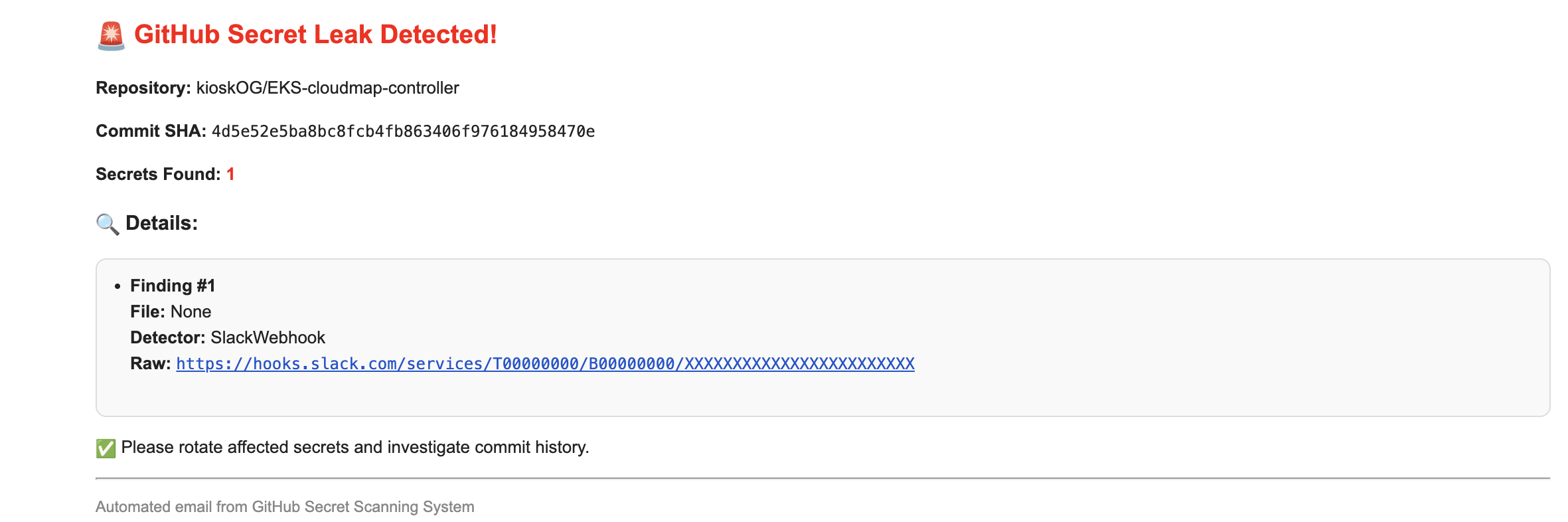
Push the file and see TruffleHog + Kafka + Email in action!
Example Email
🧪 Troubleshooting
| Issue | Fix |
|---|---|
NoBrokersAvailable | Check Kafka listener IPs and FastAPI config |
TruffleHog scan failed | Ensure correct TruffleHog binary path and permissions |
| Email not sending | Use App Password + enable less secure apps |
🧱 Roadmap
- Add Slack/Jira integrations
- Add HTML dashboard for scan history
- Dockerize entire system with healthchecks
- Secret rotation suggestions using AWS APIs
⚡ Should You Integrate TruffleHog into GitHub Actions Instead of Your Own Code?
| Option | Pros | Cons |
|---|---|---|
| TruffleHog in GitHub Actions | ✅ Very easy to set up ✅ No server management ✅ Direct scan on PRs/Pushes ✅ GitHub-native logs and alerts | ❌ Can’t easily integrate with Kafka (unless you code a custom GitHub action or webhook output) ❌ Limited customization of post-processing (like customized Kafka message, complex flows) |
| TruffleHog from Your Own Webhook Server | ✅ Full flexibility: scan, push to Kafka, custom alerting ✅ One place to control workflow ✅ Can scale later easily (multiple repos, central dashboard) | ❌ More infra to manage (webhook server, background workers) |
🎯 My Honest Suggestion
If your goal is just lightweight scan (alert on finding credentials), then GitHub Actions is faster and enough.
But if you want a full pipeline like:
Webhook → Trufflehog → Kafka → Email (or Slack alert, Jira ticket), then own server-based approach is better (more flexible + enterprise ready).