
Netbird Management Utility
Overview
The Netbird Management Utility is a Python-based tool that provides a dynamic, menu-driven interface for managing Netbird resources efficiently. It is designed to simplify the management of Netbird entities such as accounts, users, setup keys, ACL policies, posture checks, name servers, and more by enabling operations through an interactive terminal menu.
Features
- Dynamic Menus: An intuitive, interactive menu system for streamlined navigation.
- Comprehensive Operations:
- List resources such as accounts, users, setup keys, ACL policies, posture checks, and routes.
- Create new entities like setup keys, posture checks, ACL policies, DNS groups, and routes.
- Update existing resources, including ACL policies and posture checks.
- Delete expired setup keys or other entities as needed.
- Help Option: Each menu includes a
Help (Show Menu)feature to redisplay options. - Seamless Navigation: Navigate between menus or return to the main menu effortlessly.
- Automation Ready: Ideal for managing Netbird resources programmatically, making it a key tool for DevOps engineers.
Script Structure
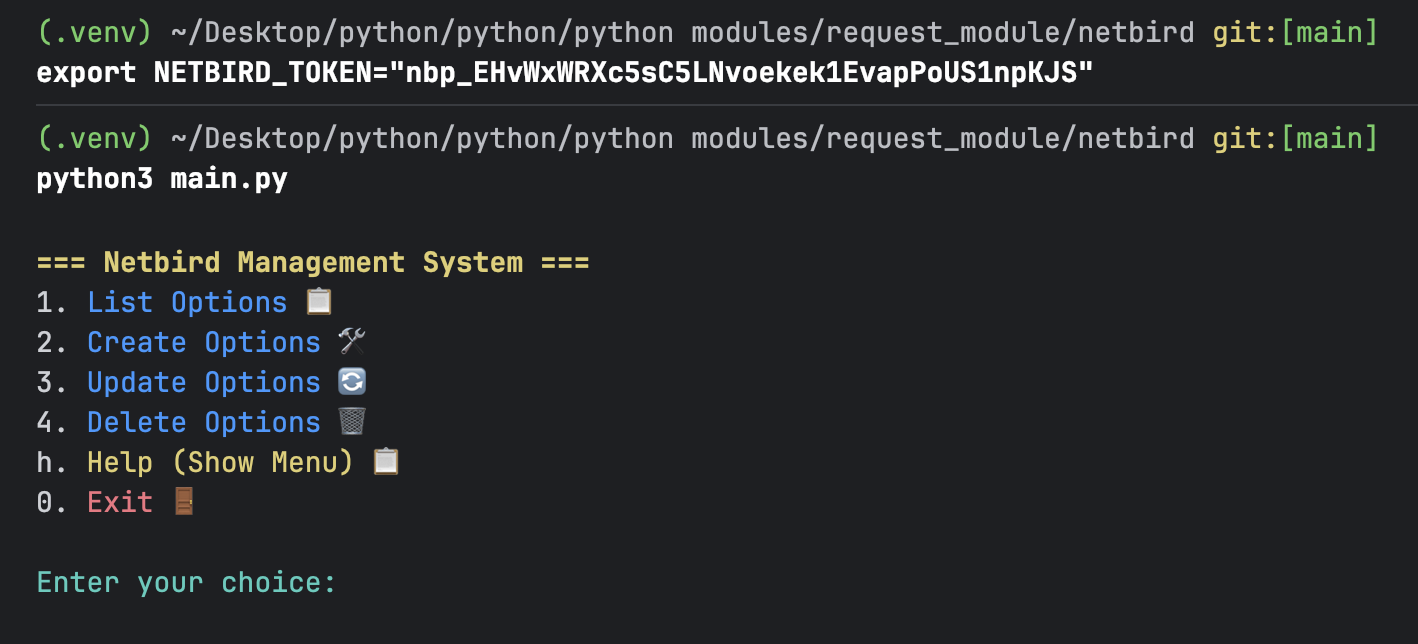
1. Main Menu
The main menu serves as the entry point, offering high-level options:
- List Options: Access submenus for listing various Netbird resources.
- Create Options: Navigate to submenus for creating resources.
- Update Options: Access submenus for modifying existing resources.
- Delete Options: Submenu for removing entities such as expired setup keys.
- Exit: Exit the utility gracefully.
2. Submenus
Each operation has its own submenu with context-specific actions:
- List Options: Fetch and display data for entities like accounts, users, ACL policies, routes, and more.
- Create Options: Define new resources with structured input, such as setup keys and posture checks.
- Update Options: Modify resources like ACL policies and network routes as needed.
- Delete Options: Safely remove entities such as setup keys.
3. Menu Navigation
The utility uses the display_menu function to generate menus dynamically. Menus are displayed with a clear title and actionable options. You can choose to:
- Execute operations.
- Go back to the previous menu.
- Exit the script entirely.
4. Helper Functions
The script relies on modular helper functions for managing specific Netbird resources:
- List Functions:
list_accounts,list_users,list_acl_policies, etc. - Create Functions:
create_setup_keys,create_posture_checks, etc. - Update Functions:
update_acl_policies,update_posture_checks, etc. - Delete Functions:
delete_setup_keys.
Files and Directory Structure
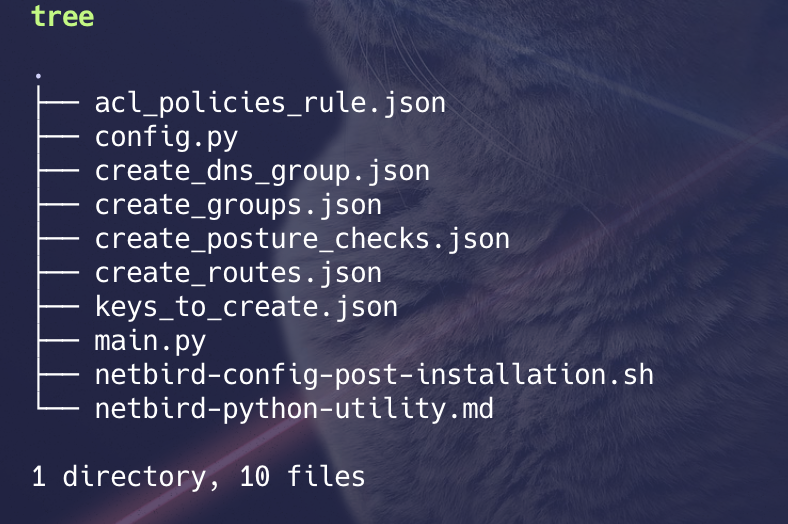
The utility comprises several scripts and JSON configuration files to support its operations. Download all files and organize them as shown in the directory structure below:
Key Files:
- main-script: The primary script to execute the utility.
- config.py: Configuration file for environment variables and reusable settings.
- acl_policies_rule.json: Template for ACL policy creation.
- create_dns_group.json: JSON file for DNS group creation.
- create_groups.json: Configuration for group management.
- create_posture_checks.json: Template for posture checks.
- create_routes.json: Configuration for creating routes.
- keys_to_create.json: Template for setup key creation.
Once you have the script, create a group first of all. take the id of that group & make required changes in
jsonfile, required for groups. As groups are the most important entities in Netbird.
These json files are holding the
group id,peer&peer group id'swhich i’m using, pls update the group id as required.
Usage
Step-by-Step Instructions
-
Run the Script: Execute the
main.pyscript from your terminal or command prompt. The main menu will be displayed, allowing you to choose an operation. -
Navigate Menus: Use the provided options to explore functionalities such as listing, creating, updating, or deleting resources. Simply enter the corresponding number or letter.
- Perform Operations:
- For List operations, results will be displayed in the terminal.
- For Create or Update, you may need to provide input or modify predefined JSON files.
- For Delete, expired setup keys or specified resources will be removed.
- Exit: Select the “Exit 🚪” option from the main menu to terminate the script.
How to Run the Script
Pre-requisites
-
Create a Service User: Log in to the Netbird dashboard and create a dedicated service user.
-
Generate a Personal Access Token (PAT): Obtain a PAT token for the service user to authenticate API requests.
Steps
- Set the
NETBIRD_TOKEN: Export the token as an environment variable in your terminal session:export NETBIRD_TOKEN="nbp_EHvWxWRXc5sC5LNvoekek1EvapPoUS1npKJS" - Run the Script: Execute the
main.pyscript:python3 main.py
This script is idempotent, means it will only create the resource if not already present, if already present, it will skip the creation process as the resource is already been in desired state.
Be focused while running the script.
Example Execution
- Custom Templates: Use the JSON templates provided in the repository to streamline resource creation and updates.
- Modular Design: The script is designed for extensibility. You can add new list, create, update, or delete functionalities as needed.
- Error Handling: Ensure proper exception handling is implemented for API calls to handle edge cases and network issues.
- Testing: Always test the script in a staging environment before deploying to production.
Disclaimer
This script is intended as a utility tool for managing Netbird resources efficiently. Ensure compliance with your organization’s security policies and test the script in a safe environment before deploying it in production.