CPU vs GPU vs DPU vs TPU vs LPU vs NPU - A Complete Guide
CPU vs GPU vs DPU vs TPU vs LPU vs NPU — what do they actually do, how are they different, and when should you use each one?
Modern computing is no longer built around a single processor doing everything.
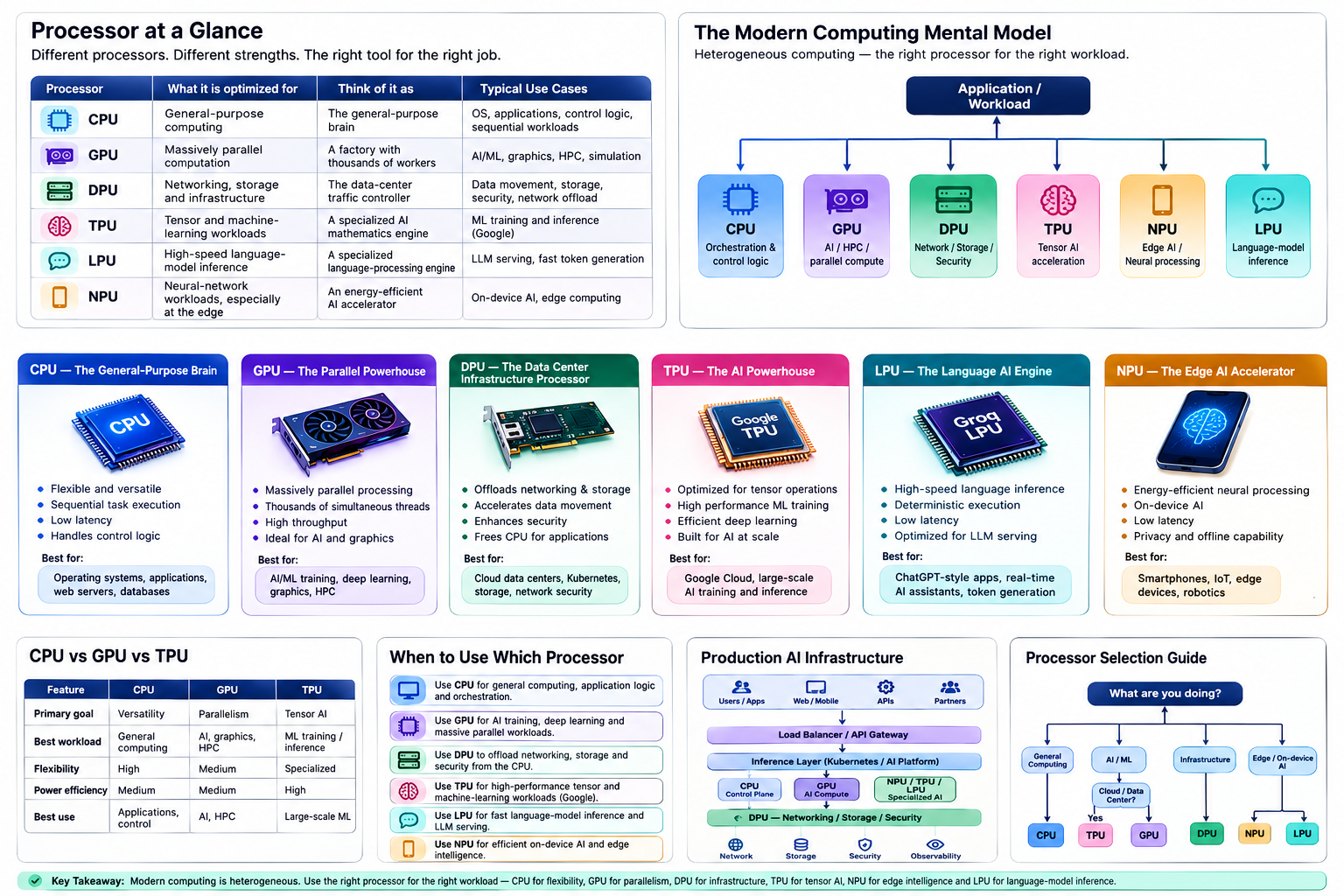
A traditional server might have relied almost entirely on a CPU. Today, a modern AI server can contain CPUs for general-purpose computing, GPUs for massively parallel computation, DPUs for networking and infrastructure offload, and specialized accelerators for machine learning and inference.
Then things become even more confusing.
You encounter terms such as:
- CPU
- GPU
- DPU
- TPU
- NPU
- LPU
- ASIC
- AI accelerator
- SmartNIC
- Neural accelerator
They sound similar, but they solve very different problems.
The easiest way to understand them is not to memorize their names.
Instead, ask one question:
What kind of work is this processor designed to do exceptionally well?
Once you understand that, the differences become much easier to remember.
The Short Version
| Processor | Think of it as… | What does it actually do? |
|---|---|---|
| CPU | The Manager | Handles general tasks, runs the operating system, and coordinates everything. Highly flexible, but not the fastest at heavy math. |
| GPU | The Factory Floor | Packed with thousands of smaller workers (cores) that process massive amounts of data at the same time. Perfect for training AI and rendering graphics. |
| DPU | The Traffic Cop | Offloads networking, storage, and security tasks so the CPU doesn’t get bogged down managing data flow. |
| TPU | The AI Math Whiz | Google’s custom chip designed purely for the specific heavy math (tensor operations) that neural networks rely on. |
| LPU | The Speed Reader | Built specifically to run Language Models (like ChatGPT) as fast as possible. Optimized for generating words with zero lag. |
| NPU | The Efficiency Expert | A lightweight AI chip built directly into phones and laptops to handle AI tasks (like face ID or blur backgrounds) without killing the battery. |
Key Takeaway
These processors aren’t competing to replace each other. A modern AI data center uses all of them together!
The CPU manages the application, the GPU/TPU trains the AI models, the LPU generates the text responses, and the DPU moves the data around securely.
For example:
flowchart TD
    APP[AI APPLICATION] --> CPU[CPU<br/>Orchestration]
    CPU --> GPU[GPU<br/>AI/ML]
    CPU --> NPU[NPU<br/>Edge AI]
    GPU --> DPU[DPU<br/>Network / Storage]
And in Google Cloud, a TPU may replace the GPU for workloads designed around Google’s TPU ecosystem.
1. Why Do We Need Different Processors?
To understand the evolution of processors, consider a simple CPU.
A CPU is extremely flexible.
You can ask it to:
- run Linux
- execute Python
- handle an HTTP request
- run a database
- compress a file
- perform calculations
- manage Kubernetes
- execute Terraform
- run a web browser
- control other accelerators
The CPU can do almost everything.
But flexibility has a cost.
Suppose you need to perform the same mathematical operation on millions of pieces of data.
For example:
1 × 2
2 × 3
3 × 4
4 × 5
...
1,000,000 × 1,000,000
A CPU can do this, but it isn’t necessarily the most efficient architecture for the job.
Instead of asking one highly flexible worker to perform every task, we can build specialized hardware containing many processing elements designed to perform similar operations simultaneously.
That is where GPUs and other accelerators become useful.
The evolution roughly looks like this:
flowchart LR
    CPU[CPU] --> GPU[GPU<br/>Parallel computation]
    CPU --> DPU[DPU<br/>Infrastructure processing]
    CPU --> TPU[TPU<br/>Tensor computation]
    CPU --> NPU[NPU<br/>Neural-network acceleration]
    CPU --> LPU[LPU<br/>Language-model inference]
This is the fundamental idea behind heterogeneous computing.
2. CPU — The General-Purpose Brain
What is a CPU?
CPU stands for Central Processing Unit.
It is the general-purpose processor responsible for executing the operating system, applications, system services and orchestration logic.
Examples include:
- Intel Xeon
- Intel Core
- AMD EPYC
- AMD Ryzen
- Arm-based CPUs
- Apple Silicon
The defining characteristic of a CPU is flexibility.
A CPU is designed to efficiently handle a huge variety of workloads rather than one narrow workload.
How Does a CPU Work?
A simplified CPU looks like:
flowchart TD
    subgraph CPU
        CU[Control Unit]
        REG[Registers]
        CACHE[Cache]
        ALU[ALUs]
        BL[Branch Logic]
    end
    CPU --> RAM[RAM]
Modern CPUs contain multiple cores.
Each core can execute instructions independently.
For example:
flowchart LR
    CPU[CPU] --> C0[Core 0]
    CPU --> C1[Core 1]
    CPU --> C2[Core 2]
    CPU --> C3[Core 3]
    CPU --> C4[Core 4]
    CPU --> C5[Core 5]
    CPU --> C6[Core 6]
    CPU --> C7[Core 7]
Modern CPUs also contain sophisticated:
- caches
- branch predictors
- out-of-order execution
- instruction pipelines
- SIMD/vector units
- memory controllers
These features make CPUs extremely good at complicated, branching and latency-sensitive workloads.
What Are CPUs Good At?
CPUs excel at:
- operating systems
- application logic
- databases
- web servers
- API services
- Kubernetes control-plane workloads
- system management
- virtualization
- orchestration
- sequential and irregular workloads
For example:
if user_is_authenticated:
    process_request()
else:
    return_error()
This kind of logic contains branching and control flow.
CPUs are very good at it.
CPU Mental Model
Think of a CPU as:
A highly skilled worker who can perform almost any job.
The worker is extremely versatile.
But if you have millions of identical jobs, hiring thousands of specialized workers may be more efficient.
That is where the GPU comes in.
3. GPU — The Parallel Processing Powerhouse
What is a GPU?
GPU stands for Graphics Processing Unit.
GPUs were originally designed primarily for graphics workloads.
Graphics rendering contains enormous amounts of parallel computation.
For example, rendering a 4K image involves millions of pixels.
Many operations can be performed independently:
Pixel 1 → calculate
Pixel 2 → calculate
Pixel 3 → calculate
Pixel 4 → calculate
Pixel 5 → calculate
...
Pixel millions → calculate
This makes GPUs excellent at parallel workloads.
And machine learning happens to contain enormous amounts of parallel mathematical computation.
That is why GPUs became fundamental to modern AI.
4. Why GPUs Are So Good for AI
Neural networks perform huge numbers of mathematical operations.
A simplified neural-network operation might look like:
Y = X × W + B
Where:
- X = input
- W = weights
- B = bias
- Y = output
Matrix multiplication contains many independent operations.
Instead of:
flowchart TD
    CPU[CPU]
    CPU --> O1[Operation 1]
    O1 --> O2[Operation 2]
    O2 --> O3[Operation 3]
    O3 --> O4[Operation 4]
A GPU can execute many operations concurrently:
flowchart TD
    GPU[GPU]
    GPU --> O1[Operation 1]
    GPU --> O2[Operation 2]
    GPU --> O3[Operation 3]
    GPU --> O4[Operation 4]
    GPU --> O5[Operation 5]
    GPU --> O6[Operation 6]
    GPU --> O7[Operation 7]
    GPU --> O8[Operation 8]
    O1 & O2 & O3 & O4 & O5 & O6 & O7 & O8 --> R[Result]
This is why GPUs are so effective for:
- deep learning
- large language models
- computer vision
- scientific computing
- simulations
- graphics
- high-performance computing
NVIDIA GPUs, for example, are widely used for AI training and inference, while AMD’s Instinct family targets AI and HPC workloads.
5. CPU vs GPU
The most important distinction is:
CPU = optimized for flexibility and low-latency general-purpose execution.
GPU = optimized for throughput and massive parallelism.
Imagine a restaurant.
CPU
One highly experienced chef:
Chef
 |
 +-- Cook
 +-- Clean
 +-- Prepare
 +-- Serve
 +-- Handle special requests
Very flexible.
GPU
Hundreds of specialized kitchen workers:
Worker Worker Worker Worker
Worker Worker Worker Worker
Worker Worker Worker Worker
Worker Worker Worker Worker
Extremely effective when everyone performs similar operations simultaneously.
6. DPU — The Data Center Infrastructure Processor
DPU stands for Data Processing Unit.
This is where things become particularly interesting for cloud and infrastructure engineers.
A DPU is designed to accelerate and offload infrastructure workloads such as:
- networking
- storage
- security
- encryption
- packet processing
- virtualization infrastructure
- data movement
NVIDIA’s BlueField platform, for example, combines compute with hardware acceleration for networking, storage and security.
7. Why Do We Need DPUs?
Imagine a server running a major application.
The CPU might be doing:
Application
Database
Kubernetes
Networking
Storage
Encryption
Virtualization
Security
A significant amount of CPU capacity can be consumed by infrastructure operations.
Instead of using application CPUs for all of these jobs, we can offload infrastructure processing.
flowchart TD
    SERVER[SERVER] --> CPU[CPU<br/>Application Workloads]
    SERVER --> DPU[DPU<br/>Infrastructure Workloads]
    DPU --> NET[Network]
    DPU --> STO[Storage]
    DPU --> SEC[Security]
The CPU is freed to focus on the application.
8. What Does a DPU Actually Do?
A DPU can accelerate things such as:
Networking
flowchart TD
    P[Packet] --> DPU[DPU]
    DPU --> F[Firewall / Routing / Switching]
    F --> APP[Application]
Storage
flowchart TD
    APP[Application] --> DPU[DPU]
    DPU --> STO[Storage / NVMe / Network Storage]
Security
flowchart TD
    T[Traffic] --> DPU[DPU]
    DPU --> E[Encryption / Isolation / Security]
    E --> APP[Application]
This is especially useful in:
- cloud data centers
- hyperscale infrastructure
- Kubernetes infrastructure
- storage systems
- multi-tenant environments
- AI data centers
9. DPU vs SmartNIC
You will often hear the term SmartNIC alongside DPU.
They overlap.
A SmartNIC is essentially a programmable network adapter capable of performing processing beyond basic packet transmission.
A DPU generally goes further by providing substantial compute capability and infrastructure offload.
A simplified evolution is:
flowchart LR
    NIC[NIC] --> SMART[SmartNIC]
    SMART --> DPU[DPU]
The exact terminology varies across vendors and architectures, so it is better to focus on capabilities rather than treating the terms as perfectly interchangeable.
10. TPU — Google’s Tensor Processing Unit
TPU stands for Tensor Processing Unit.
This is one area where the original comparison needs an important correction.
A TPU is not simply another generic name for an AI accelerator.
TPU is Google’s custom ASIC family designed specifically for machine-learning workloads.
Google designed TPUs around the mathematical operations that dominate neural networks, particularly tensor and matrix computations.
11. Why Are Tensors Important?
Machine-learning models operate heavily on tensors.
A tensor can be thought of as a generalized multidimensional array.
For example:
flowchart TD
    S[Scalar] --> V[Vector]
    V --> M[Matrix]
    M --> 3D[3D Tensor]
    3D --> 4D[4D Tensor]
    4D --> H[Higher-dimensional tensors]
A neural network performs enormous numbers of tensor operations.
For example:
flowchart TD
    IN[Input Tensor] --> MM1[Matrix Multiplication]
    MM1 --> ACT[Activation]
    ACT --> MM2[Matrix Multiplication]
    MM2 --> NORM[Normalization]
    NORM --> OUT[Output]
TPUs are specifically designed to accelerate these operations.
Google describes TPU hardware around specialized matrix-multiplication units and systolic-array architectures.
12. TPU Architecture Mental Model
A simplified view:
flowchart TD
    subgraph TPU
        TC[Tensor Cores<br/>Matrix Multiply Units]
    end
    TPU --> HBM[HBM]
    HBM --> HSI[High-Speed Interconnect]
The architecture is designed around moving and processing large amounts of tensor data efficiently.
Google’s current Cloud TPU platform supports large-scale training and inference and integrates with frameworks such as JAX and PyTorch.
13. TPU vs GPU
This is an important interview question.
GPU
General parallel accelerator
          ↓
Graphics
AI
HPC
Simulation
Scientific computing
TPU
Purpose-built ML accelerator
          ↓
Tensor operations
Matrix multiplication
Deep learning
Large-scale AI
The GPU is generally more flexible.
The TPU is more specialized.
This does not mean:
TPU = better GPU
or
GPU = better TPU
The correct answer is:
The best accelerator depends on the workload, software ecosystem, model architecture, availability, cost and scale.
14. What About NVIDIA and AWS “TPU-Like” Hardware?
This is another important distinction.
NVIDIA has AI GPUs and other accelerators.
AWS has purpose-built AI accelerators such as Trainium and Inferentia.
These compete in the broader AI accelerator market, but they are not literally Google’s TPUs.
So instead of saying:
“NVIDIA and AWS make TPUs.”
A technically accurate statement is:
“Google develops TPUs, while NVIDIA, AWS and other vendors offer competing or complementary AI accelerator architectures.”
That distinction matters when writing technical documentation or preparing for an infrastructure certification.
15. LPU — Language Processing Unit
LPU stands for Language Processing Unit.
Unlike CPU, GPU and DPU, LPU is not a universally standardized processor category across the entire industry.
The term is strongly associated with Groq’s LPU architecture, which was designed specifically for fast AI inference and language-model workloads.
Groq describes its LPU around principles such as:
- software-first architecture
- deterministic execution
- on-chip memory
- programmable scheduling
- high-speed inference
16. Why Would We Need an LPU?
Modern LLM inference has a very different performance profile from model training.
Suppose a user asks:
"What is Kubernetes?"
The system must generate tokens:
What
 ↓
is
 ↓
Kubernetes
 ↓
?
The latency between tokens matters.
For conversational AI, users care about:
- time to first token
- tokens per second
- latency
- throughput
- cost per token
- energy efficiency
An architecture specifically optimized for inference can therefore make sense.
Groq describes its LPU as a processor architecture built around the requirements of LLM inference.
17. LPU vs GPU
Think about the difference like this:
GPU
Highly parallel
Flexible
Programmable
Excellent for:
- Training
- Inference
- HPC
- Graphics
LPU
Highly specialized
Inference-focused
Deterministic execution
Excellent for:
- LLM inference
- Token generation
- Low-latency AI serving
The important point is that an LPU doesn’t replace GPUs everywhere.
It targets a particular part of the AI workload spectrum.
18. NPU — Neural Processing Unit
NPU stands for Neural Processing Unit.
An NPU is a specialized accelerator designed to efficiently execute neural-network workloads.
NPUs are particularly common in:
- smartphones
- laptops
- embedded systems
- IoT devices
- edge computing
- robotics
- automotive systems
Examples include neural/AI acceleration capabilities found in modern mobile and client processors.
19. Why Do Devices Need NPUs?
Imagine a smartphone performing:
- face recognition
- camera enhancement
- background removal
- speech recognition
- translation
- generative AI
- image classification
You could send everything to a cloud GPU.
But that creates:
flowchart TD
    D1[Device] --> I1[Internet]
    I1 --> C[Cloud]
    C --> GPU[GPU]
    GPU --> I2[Internet]
    I2 --> D2[Device]
This creates:
- latency
- bandwidth consumption
- privacy concerns
- cloud costs
An NPU allows the device to perform AI locally.
flowchart TD
    SP[Smartphone] --> CPU[CPU<br/>General Logic]
    SP --> GPU[GPU<br/>Graphics]
    SP --> NPU[NPU<br/>AI Workloads]
This is called edge AI or on-device AI.
20. NPU vs GPU
The distinction is primarily about optimization and deployment.
GPU
Usually:
- more general-purpose parallel accelerator
- high throughput
- large-scale AI
- graphics
- HPC
- training and inference
NPU
Usually:
- specialized neural-network acceleration
- power efficient
- integrated into client/mobile/edge SoCs
- inference-focused in many practical deployments
An NPU is therefore especially valuable when:
You need AI computation close to the user with low power consumption and low latency.
21. NPU vs TPU
Both accelerate neural-network workloads, but they operate in different contexts.
TPU
Typically:
Cloud / Data Center
        ↓
Large-scale AI
        ↓
Training + Inference
NPU
Typically:
Device / Edge
      ↓
Low-power AI
      ↓
On-device inference
There is some overlap, but their design goals and deployment environments are different.
22. Putting Everything Together
Now we can build the complete mental model.
flowchart TD
    COMP[COMPUTING] --> CPU[CPU<br/>General Computing]
    COMP --> GPU[GPU<br/>Parallel Computing]
    COMP --> DPU[DPU<br/>Infrastructure Processing]
    DPU --> NET[Network]
    DPU --> STO[Storage]
    DPU --> SEC[Security]
    GPU --> AIT[AI Training]
    GPU --> AII[AI Inference]
    CPU --> SPEC[Specialized AI Accelerators]
    SPEC --> TPU[TPU<br/>Tensor AI]
    SPEC --> NPU[NPU<br/>Edge Neural]
    SPEC --> LPU[LPU<br/>Language AI]
The key insight is:
These processors are specialized around different bottlenecks.
23. A Simple “Who Does What?” Mental Model
If you remember only one thing, remember this:
CPU → Thinks
GPU → Calculates in parallel
DPU → Moves and protects data
TPU → Calculates tensors
NPU → Calculates neural networks efficiently
LPU → Generates language efficiently
Or even simpler:
CPU = General
GPU = Parallel
DPU = Infrastructure
TPU = Tensor
NPU = Neural
LPU = Language
24. Processor Comparison
| Processor | Primary Goal | Typical Location | Best At |
|---|---|---|---|
| CPU | General computation | Everywhere | OS, applications, control logic |
| GPU | Massive parallel computation | Servers, PCs, workstations | AI, graphics, HPC |
| DPU | Infrastructure offload | Data centers | Networking, storage, security |
| TPU | Tensor acceleration | Google infrastructure/cloud | ML training and inference |
| NPU | Efficient neural processing | Phones, PCs, edge devices | On-device AI |
| LPU | Fast language inference | AI inference infrastructure | LLM serving |
25. Which Processor Should You Choose?
There is no universally “best” processor.
The correct choice depends on the workload.
Scenario 1: Web Server
You need:
HTTP
Business Logic
Database Queries
Authentication
API Processing
Choose:
CPU
Scenario 2: AI Model Training
You need:
Large matrices
Tensor operations
Massive parallelism
Large memory bandwidth
Choose:
GPU or specialized AI accelerator such as TPU, depending on your framework, platform and workload.
Scenario 3: Kubernetes Infrastructure
You need:
Networking
Storage
Security
Packet Processing
Virtualization
A:
DPU
can offload infrastructure services from the host CPU.
Scenario 4: Smartphone Face Recognition
You need:
Low latency
Low power
Local inference
Privacy
Choose:
NPU / neural accelerator
Scenario 5: Large-Scale LLM Inference
You need:
High tokens/sec
Low latency
High throughput
Efficient inference
Potential options include:
- GPUs
- dedicated AI accelerators
- inference-specialized architectures such as Groq LPUs
The right choice depends heavily on model architecture, serving stack, memory requirements and economics.
26. Why AI Changed Processor Architecture
The AI revolution changed the definition of a “computer.”
Traditional computing looked like:
CPU
 |
 +--- RAM
 |
 +--- Storage
 |
 +--- Network
Modern AI infrastructure looks more like:
                         CPU
                          |
          +---------------+---------------+
          |               |               |
          v               v               v
        GPU              DPU          Accelerator
          |               |               |
          |               |               |
        HBM            Network         AI Memory
          |
          v
      AI Workload
The CPU remains important.
But it is no longer expected to perform every operation itself.
This is the foundation of heterogeneous computing.
27. Heterogeneous Computing
Heterogeneous computing means using different processors for different workloads.
For example:
Application
     |
     v
   CPU
     |
     +-------> GPU
     |          |
     |          +--> AI computation
     |
     +-------> DPU
     |          |
     |          +--> Networking
     |          +--> Storage
     |          +--> Security
     |
     +-------> NPU
                |
                +--> Local AI
Instead of asking:
“Which processor is fastest?”
Ask:
“Which processor is best suited to this workload?”
That is a much better architectural question.
28. Why This Matters for AI Infrastructure
If you work in DevOps, SRE, MLOps or cloud infrastructure, understanding these processors becomes increasingly important.
Running a GPU workload is not simply:
docker run my-model
A production AI infrastructure stack can involve:
flowchart TD
    APP[Application] --> K8S[Kubernetes]
    K8S --> GOP[GPU Operator / Device Plugin]
    GOP --> GN[GPU Nodes]
    GN --> CUDA[CUDA]
    GN --> GMEM[GPU Memory]
    GN --> HSN[High-Speed Network]
    GN --> STO[Storage]
    GN --> DPU[DPU]
    GN --> OBS[Observability]
You need to understand:
- GPU scheduling
- GPU memory
- PCIe
- NVLink / high-speed interconnects
- NUMA
- RDMA
- container runtimes
- Kubernetes device plugins
- GPU operators
- inference serving
- model parallelism
- data parallelism
- storage throughput
- network bottlenecks
The accelerator is only one component of the system.
29. The Biggest Mistake: Looking Only at FLOPS
One common mistake is to compare accelerators purely by compute performance.
For example:
Accelerator A = 100 TFLOPS
Accelerator B = 120 TFLOPS
It is tempting to conclude:
B > A
But real-world AI performance depends on much more than raw compute.
You also need to consider:
Memory capacity
Can the model fit?
Model = 80 GB
GPU Memory = 40 GB

Problem.
Memory bandwidth
How quickly can the accelerator access model weights?
Interconnect
Can multiple accelerators communicate efficiently?
Network
Can data reach the accelerator quickly enough?
Software ecosystem
Does your framework support the hardware efficiently?
Kernel optimization
Are optimized kernels available?
Power efficiency
How much performance do you get per watt?
Cost
How much does each generated token cost?
Therefore:
Peak FLOPS is not the same thing as application performance.
30. AI Infrastructure Is a System, Not a Chip
This is especially important when designing production AI platforms.
A modern AI system can look like:
flowchart TD
    U[Users] --> LB[Load Balancer]
    LB --> API[API Gateway]
    API --> INF[Inference Layer]
    INF --> CPU[CPU<br/>Control Plane]
    INF --> GPU[GPU/AI<br/>Compute]
    CPU & GPU --> DPU[DPU]
    DPU --> NET[Network]
    DPU --> STO[Storage]
    DPU --> SEC[Security]
Performance can be limited by any layer.
For example:
GPU = 95% utilization
sounds good.
But suppose:
Storage = slow
Network = saturated
CPU = bottleneck
GPU memory = insufficient
Then simply buying a faster GPU may not solve the problem.
31. Processor Selection Cheat Sheet
Use this decision tree:
flowchart TD
    Q[What are you doing?] --> GC[General Computing]
    Q --> AI[AI/ML]
    Q --> INFRA[Infrastructure]
    GC --> CPU[CPU]
    INFRA --> DPU[DPU]
    AI --> TR[Training]
    AI --> INF[Inference]
    AI --> EDGE[Edge AI]
    TR --> GPU[GPU]
    INF --> GPULPU[GPU/LPU]
    EDGE --> NPU[NPU]
    TR --> TPU[TPU on supported Google workloads]
32. The Most Important Interview Question
If an interviewer asks:
“What is the difference between CPU and GPU?”
Don’t simply say:
CPU is sequential and GPU is parallel.
That is an oversimplification.
A stronger answer is:
“A CPU is a general-purpose processor optimized for low-latency execution, complex control flow and a broad range of workloads. A GPU is a throughput-oriented parallel processor containing many execution resources designed to perform large numbers of similar operations concurrently. That’s why CPUs are typically used for application orchestration and control logic, while GPUs are particularly effective for graphics, scientific computing and machine-learning workloads.”
33. What Is the Difference Between GPU and DPU?
A good interview answer:
“A GPU accelerates compute-intensive parallel workloads such as graphics, AI and HPC. A DPU is focused on infrastructure processing, particularly networking, storage and security. The DPU can offload these operations from the host CPU so the CPU can focus on application workloads.”
This distinction is particularly important in cloud and AI data-center architecture.
34. What Is the Difference Between TPU and GPU?
A good answer:
“A GPU is a general-purpose parallel accelerator that can support graphics, AI, HPC and many other workloads. A TPU is Google’s custom ASIC architecture specifically designed to accelerate machine-learning workloads, particularly tensor and matrix operations. The choice depends on the workload and software ecosystem rather than one being universally better.”
Google’s TPU documentation explicitly describes TPUs as custom-developed ASICs for ML workloads.
35. What Is the Difference Between NPU and GPU?
A good answer:
“Both can accelerate AI workloads, but an NPU is typically designed specifically for neural-network operations with strong power efficiency, making it particularly useful for edge and client devices. GPUs are more general-purpose parallel accelerators and are widely used for large-scale AI training and inference.”
36. What Is the Difference Between LPU and NPU?
This is where terminology matters.
An NPU is a broad industry term for a neural-network accelerator.
An LPU is more specialized terminology, strongly associated with architectures such as Groq’s LPU for language-model inference.
So:
NPU
 |
 +-- Neural-network acceleration
 |
 +-- Broad industry terminology


LPU
 |
 +-- Language-model workloads
 |
 +-- Specialized inference architecture
They should not be treated as universally standardized categories with identical definitions.
37. One Final Mental Model
Imagine a huge company.
CPU — Manager
Handles:
Decision making
Coordination
Control
General work
GPU — Workforce
Handles:
Thousands of similar tasks simultaneously
DPU — Logistics Department
Handles:
Moving goods
Networking
Storage
Security
Infrastructure
TPU — Mathematics Department
Specialized in:
Tensor and matrix calculations
NPU — Local AI Specialist
Handles:
Neural-network workloads efficiently
LPU — Language Specialist
Handles:
Language-model inference
Token generation
So the whole company looks like:
flowchart TD
    COMP[COMPANY] --> CPU[CPU<br/>MANAGEMENT]
    CPU --> GPU[GPU<br/>Workforce]
    CPU --> DPU[DPU<br/>Logistics]
    CPU --> AI[AI Specialists]
    DPU --> NET[Network]
    DPU --> STO[Storage]
    AI --> TPU[TPU]
    AI --> NPU[NPU]
    AI --> LPU[LPU]
38. The Bigger Picture
The future of computing is not:
CPU vs GPU
It is:
CPU + GPU + DPU + Specialized Accelerators
Modern data centers increasingly resemble a collection of specialized compute engines rather than a single type of processor doing everything.
The CPU provides general-purpose control.
The GPU provides massive parallel compute.
The DPU handles infrastructure and data movement.
The TPU provides specialized tensor acceleration in Google’s ecosystem.
The NPU brings efficient neural processing closer to the edge.
And specialized inference architectures such as Groq’s LPU target the unique requirements of language-model serving.
The real architectural challenge is therefore not simply choosing the fastest processor.
It is determining:
Which processor should perform which workload, where should that workload execute, how does data reach it, and how do all of these components work together efficiently?
That is the foundation of modern heterogeneous computing and AI infrastructure.
39. Final Comparison
| Processor | Full Name | Primary Optimization | Typical Environment | Key Strength |
|---|---|---|---|---|
| CPU | Central Processing Unit | General-purpose execution | PCs, servers, cloud | Flexibility |
| GPU | Graphics Processing Unit | Massive parallelism | AI servers, PCs, HPC | Throughput |
| DPU | Data Processing Unit | Infrastructure offload | Data centers | Networking/storage/security |
| TPU | Tensor Processing Unit | Tensor operations | Google Cloud / Google infrastructure | ML acceleration |
| NPU | Neural Processing Unit | Neural-network operations | Phones, PCs, edge | Power-efficient AI |
| LPU | Language Processing Unit | Language-model inference | AI inference infrastructure | Fast language inference |
40. The One-Line Summary
If you remember nothing else, remember this:
CPU → General-purpose computing
GPU → Massively parallel computing
DPU → Data-center infrastructure
TPU → Tensor-focused AI acceleration
NPU → Efficient neural processing
LPU → Language-model inference
And the most important principle:
Modern computing is increasingly heterogeneous: use the right processor for the right workload rather than expecting one processor to do everything.
Frequently Asked Questions
Is a GPU a CPU replacement?
No.
GPUs are specialized parallel processors. CPUs remain essential for operating systems, application logic, orchestration and workloads that require complex control flow.
Is a TPU better than a GPU?
Not universally.
TPUs are purpose-built for machine-learning workloads, while GPUs offer broader programmability and a mature ecosystem across AI, graphics and HPC. The better choice depends on the workload and software stack.
Is every AI chip an NPU?
No.
“NPU” is generally used for neural-network accelerators, but the industry has many specialized AI accelerator architectures with different designs and naming conventions.
Is an LPU the same as an NPU?
No.
The terms describe different concepts. NPU is a broad category for neural-network acceleration, while LPU is strongly associated with specialized language-processing/inference architectures such as Groq’s LPU.
Is a DPU used for AI computation?
Usually its primary role is infrastructure acceleration rather than model computation.
However, DPUs can be extremely important to AI infrastructure because they can accelerate networking, storage and security operations around AI workloads.
Can a server have CPU, GPU and DPU simultaneously?
Absolutely.
This is increasingly common in high-performance cloud and AI infrastructure:
CPU → Application / Control
GPU → AI / HPC
DPU → Network / Storage / Security
Why not use GPUs for everything?
Because GPUs are not optimized for every workload.
Using a GPU for general application logic or infrastructure operations can be inefficient. Specialized processors allow each workload to run on hardware designed for it.
Conclusion
The processor landscape has evolved from a world dominated by general-purpose CPUs to a heterogeneous world containing specialized compute engines.
The CPU remains the foundation.
The GPU provides massive parallel processing.
The DPU moves infrastructure processing away from application CPUs.
The TPU specializes in tensor-based machine learning.
The NPU brings neural acceleration to power-sensitive devices.
And specialized architectures such as LPUs target high-performance language-model inference.
Understanding these differences is becoming increasingly important for software engineers, cloud engineers, DevOps engineers, MLOps engineers, SREs and AI infrastructure architects.
Because when you design a modern AI platform, the question is no longer simply:
“How many CPUs do I need?”
The better question is:
“What workloads do I have, which processor is best suited to each workload, and how do I build the infrastructure that allows all of them to work together efficiently?”
That is the real foundation of modern AI infrastructure.