Document Loaders
Building RAG-based applications using LangChain.
There are multiple components present in a RAG-based LLM application. Today, we are going to study one of those components called Document Loaders. To work with RAG in LangChain, you need to import and use different components. In LangChain, these components are called LangChain integrations, and they provide pre-built tools and abstractions for various AI tasks. One of the most basic and important components you will use in RAG-based applications is a Document Loader. In simple terms, a document loader is a tool that loads documents from different sources and converts them into a format that can be used with LangChain. The good part is that even though these loaders work with different types of data, the basic idea behind all of them is exactly the same. So once you understand one loader properly, you can easily work with most of the others.
So far, in this Generative AI wave, the biggest use case has been chatbots, where we go to a website and interact with its chatbot. Take ChatGPT, for example. ChatGPT is probably the most popular Generative AI software out there. You go to the website, enter your text or question, hit Enter, and instantly get a response.
Most of the time this works well, but there are certain situations where software like ChatGPT cannot help you.
For example, suppose you ask ChatGPT about current affairs. There is a good chance that ChatGPT was trained on past data and may not know what happened today or yesterday. In that case, it may not be able to answer your question.
Another example is when you ask questions about your personal data. Suppose you ask about emails you received in the last week. Obviously, ChatGPT cannot answer because it has never seen that data.
Similarly, if you are a programmer and ask questions about your company’s internal documentation, ChatGPT cannot answer because it has never seen that data.
So all those situations where ChatGPT lacks the necessary data are exactly where RAG-based applications help.
In a RAG-based application, you essentially provide the LLM with an external knowledge base. This external knowledge base can be anything, your company database, a collection of PDFs, your personal documents, and so on. You somehow connect this external knowledge base to the LLM.
Now, when a user asks a question that the LLM does not know, the LLM can quickly search this knowledge base, find the relevant information, and generate an answer using that external data.
The information retrieval happens from the external knowledge base, and the language generation happens using the LLM.
Where a model retrieves relevant documents from a knowledge base and then uses them as context to generate accurate and grounded responses.”
The biggest benefits of using RAG are:
- You can get up-to-date information from an LLM.
- You gain much better privacy.
Imagine you want to ask questions about a confidential personal document. One option is uploading that document to ChatGPT, but if the information is sensitive, that may not be a good idea. With RAG, you can ask questions about your documents without uploading them to ChatGPT.
Another advantage is that there is effectively no document size limitation. Suppose your document is 1 GB. You cannot upload the entire thing to ChatGPT and expect it to read everything because of context-length limitations. RAG solves this problem by splitting large documents into chunks and processing them efficiently.
These are some of the benefits you get from building RAG-based applications, and that is why they are currently such a powerful trend in the industry.
I hope you now have a rough idea of what RAG is and what RAG-based applications are. We will discuss this in more detail going forward.
My plan is not to teach you how to build a complete RAG application in one shot. Instead, I will first teach you the important components used in RAG systems. Once you understand those components properly, I will show you how to combine them to build a complete RAG-based application.
The most important components of RAG are:
- Document Loaders
- Text Splitters
- Vector Databases
- Retrievers
These four components are used to build virtually any RAG-based application. No matter how complex the architecture is, most of the time it is built using these four components.
In this section, we will learn how to load documents from different sources in LangChain. Then in future articles we will sequentially cover Text Splitters, Vector Databases, and Retrievers. Once all four are covered, we will finally learn how to build RAG-based applications.
Document Loaders in RAG: Ingesting Data for LLMs
To build any Retrieval-Augmented Generation (RAG) application, the very first step is to bring data from your external sources—such as PDFs, text files, databases, or web pages—into the system. This critical ingestion phase is handled entirely by Document Loaders.
In this guide, we will explore how Document Loaders work in LangChain, cover the four most common loaders, and understand the difference between eager and lazy loading.
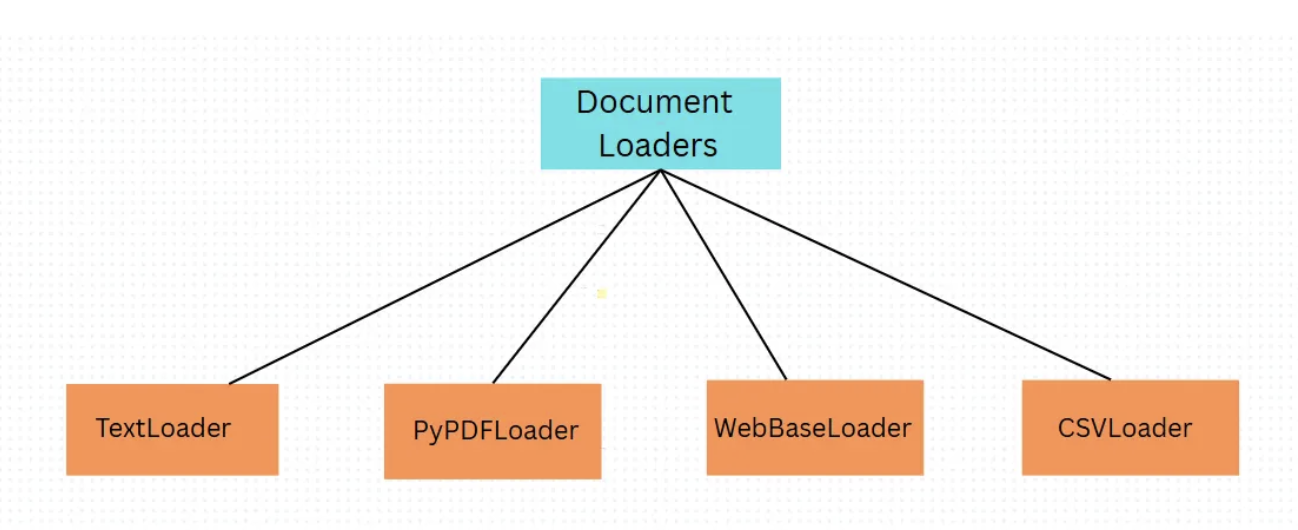
The Roadmap: Mastering Data Ingest
To fully understand how to feed external data into an LLM, we will cover:
- What are Document Loaders? (Defining the core
Documentobject) - The Big 4 Loaders (Text, PDF, Web, and CSV loaders)
- Eager vs. Lazy Loading (Optimizing memory for large-scale datasets)
- Custom Loaders (Ingesting unsupported data formats)
The Big Picture: RAG & Ingestion
In a standard LLM application, the model relies on its parametric knowledge (pre-trained weights). For private, real-time, or large-scale data, we use RAG to inject relevant context directly into the prompt.
Regardless of how complex a RAG application is, it is almost always built using four core components:
[ Raw Source ] ---> [ Document Loader ] ---> [ Text Splitter ] ---> [ Vector Database ] ---> [ Retriever ]
                      (Our Focus)             (Chunking)              (Storage)             (Search)
- Document Loaders: Load data from different sources and convert them into standard objects.
- Text Splitters: Break down large documents into smaller, semantically coherent chunks.
- Vector Databases: Store chunk embeddings to enable fast fuzzy semantic searches.
- Retrievers: Retrieve and rank the top context chunks matching the user query.
The good part is that even though these loaders work with different types of data, the basic idea behind all of them is exactly the same. So once you understand one loader properly, you can easily work with most of the others.
What is a Document Loader?
Definition:
A Document Loader is a utility in LangChain designed to retrieve raw unstructured/structured text from a specific source and convert it into a standardized list of Document objects.
Regardless of where the data comes from (a local file, a cloud bucket, or a web scraping script), LangChain standardizes the output so that all subsequent components (splitters, embedders) can process it the exact same way.
+-----------------------------------+
|      Raw Source Data File         |
+-----------------+-----------------+
                  |
                  | (Loads & Parses)
                  v
+-----------------+-----------------+
|     Standardized Document Object  |
|                                   |
|  * page_content: "Raw text..."    |
|  * metadata: {source: "...", ...} |
+-----------------------------------+
The Structure of a Document Object
Every Document object in LangChain contains two fields:
page_content: A string containing the extracted text content.metadata: A dictionary containing arbitrary key-value pairs (e.g., source file path, page number, creation date, author name).
The basic idea is that the creators of LangChain realized that to build RAG applications, you need to load data, and that data can come from many different sources.
For example:
- PDFs
- Text files
- Databases
- Cloud providers
There are hundreds of possible data sources. We need to ensure that regardless of where the data comes from, it is converted into a common, standardized format that can be used with other LangChain components.
To solve this, LangChain created a standardized format called a Document.
Whenever we fetch data using a Document Loader, it is converted into this Document format.
Every Document object contains two things:
-
page_content— the actual content/data. -
metadata— information about the document such as source, file location, creation date, last modified date, author name, etc.
1. Text Loader (TextLoader)
The simplest loader in LangChain. It takes raw text files (e.g., .txt, .log, .py code snippets) and loads them into a single Document object.
The Text Loader is probably the simplest document loader in LangChain. Its job is straightforward: take text files and convert them into Document objects.
You typically use it when processing:
- Log files
- Code snippets
- Transcripts (such as YouTube transcripts)
Here is an example of how to use the Text Loader in LangChain:
from langchain_community.document_loaders import TextLoader

# 1. Initialize the loader with the file path
file_path = "poem.txt"
loader = TextLoader(file_path, encoding="utf-8")

# 2. Load the document
documents = loader.load()  # returns a list of Document objects

# 3. Inspect the loaded data
print(f"Loaded {len(documents)} document(s).")
print(type(documents))
print(type(documents[0]))
print("\nDocument Content:\n", documents[0].page_content)
print("\nMetadata:\n", documents[0].metadata)
Example usage with LangChain Expression Language (LCEL):
from langchain_community.document_loaders import TextLoader
from langchain_google_genai import GoogleGenerativeAI
from langchain_core.output_parsers import StrOutputParser
from langchain_core.prompts import PromptTemplate
from dotenv import load_dotenv

load_dotenv()

model = GoogleGenerativeAI(
    model="gemini-2.5-flash"
)

prompt = PromptTemplate(
    template='Write a summary for the following - \n {poem}',
    input_variables= ['poem']
)

parser = StrOutputParser()

loader = TextLoader('poem.txt', encoding='utf-8')

documents = loader.load()

chain = prompt | model | parser

result = chain.invoke({'poem': documents[0].page_content})
print(result)
You import the TextLoader, create a loader object, specify the path to your text file, optionally provide the encoding (UTF-8 in this case), and then call the
load()function.
Suppose I have a file called poem.txt containing a poem about cricket generated by ChatGPT.
Calling loader.load() loads the file into memory and returns a list of documents.
An important thing to notice is that regardless of which document loader you use—Text Loader, PDF Loader, or any other loader—the output is always a list of Document objects.
In this particular case, the list contains only one document.
You can access the first document with:
documents[0]
And that document contains:
page_contentmetadata
You can access them individually:
documents[0].page_content
documents[0].metadata
You can then use the page content however you like. For example, you can pass it directly to an LLM chain and ask the model to summarize the poem.
This makes the workflow extremely simple.
The key takeaway is:
- Every document loader returns a list of Document objects.
- Every Document object contains:
- Page Content
- Metadata
Once you understand that, you understand the core concept behind all document loaders.
2. PDF Loader (PyPDFLoader)
The PyPDFLoader is the standard tool for parsing PDF files. Unlike text loaders, it works on a page-by-page basis. If a PDF contains 25 pages, PyPDFLoader returns a list of 25 separate Document objects one for each page.
Each document object will have:
- Page Content
- Metadata (page number, source, etc.)
Internally, it uses the PyPDF library to read PDF files.
Because of that, it works best with simple text-based PDFs. It is not particularly good with scanned PDFs or complex layouts.
If you have image-based PDFs or heavily structured layouts, there are other loaders better suited for those cases.
Here is an example of how to use the PyPDF Loader in LangChain:
from langchain_community.document_loaders import PyPDFLoader

# 1. Initialize the loader with the file path
file_path = "file.pdf"
loader = PyPDFLoader(file_path)

# 2. Load the document (returns a list of Document objects, one per page)
documents = loader.load()

# 3. Inspect the loaded data
print(f"Loaded {len(documents)} document(s).")
print(f"\nType of loaded object: {type(documents)}")
print(f"Type of first element: {type(documents[0])}")
print(f"\nFirst Page Content:\n{documents[0].page_content}")
print(f"\nMetadata:\n{documents[0].metadata}")
Suppose I have a PDF file with 143 pages.
I import
PyPDFLoader, create a loader object, specify the PDF path, callload(), and I get back a list of 143 Document objects.
The first document contains the contents of page one.
Its metadata includes information such as:
- Producer
- Creator
- Creation date
- Title
- Source
- Total pages
- Current page number
That’s how easy it is to load PDFs into LangChain.
Alternative PDF Loaders:
If your PDF contains complex tables or layouts, consider these specialized loaders:
PDFPlumberLoader: Exceptional at extracting structured tables.UnstructuredPDFLoader: Excellent for scanned PDFs or layout-heavy media.PyMuPDFLoader: Extremely fast text extraction.
LangChain documentation provides detailed information about each loader and when to use it.
I do not recommend studying every loader. Learn them only when your project requires them.
3. Directory Loader (DirectoryLoader)
When you need to ingest an entire folder containing multiple files (like a books folder or a documentation repository), you can use the DirectoryLoader to batch-load files.
Here is an example of how to use the Directory Loader in LangChain:
from langchain_community.document_loaders import DirectoryLoader, PyPDFLoader

# 1. Define the directory path and glob pattern
folder_path = "books/"
glob_pattern = "*.pdf"  # Load only PDF files

# 2. Initialize the DirectoryLoader
loader = DirectoryLoader(
    folder_path,
    glob=glob_pattern,
    loader_cls=PyPDFLoader,  # The loader to use for each file
    show_progress=True  # Optional: shows progress bar during loading
)

# 3. Load documents (returns a list of Document objects)
documents = loader.load()

# 4. Inspect the loaded data
print(f"Total documents loaded: {len(documents)}")
print(f"\nType of loaded object: {type(documents)}")
print(f"Type of first element: {type(documents[0])}")
print(f"\nMetadata of first document:\n{documents[0].metadata}")
Suppose I have a folder named
bookscontaining three machine learning books.Using
DirectoryLoader, I specify:
- The folder path
- A glob pattern (e.g.,
- The loader class (
PyPDFLoader)When I call
load(), all PDF pages from all PDFs are loaded.
For example:
- Book 1 → 326 pages
- Book 2 → 392 pages
- Book 3 → 468 pages
Total:
1186 document objects. Each page becomes a Document object.
Metadata tells you:
- Which PDF it came from
- Total pages
- Page number
- Creation info
- Source path
DirectoryLoader can work not only with PDFs but also with text files and many other file types.
Lazy Loading
Now let’s discuss an important concept: Lazy Loading
Earlier, we used:
loader.load()
This performs eager loading.
For example, if a PDF contains 500 pages:
- All 500 pages are loaded into memory at once.
- 500 Document objects are created immediately.
This is fine for small datasets. But what if you have:
- 100 PDFs
- 500 PDFs
- Thousands of documents
Loading everything into memory at once becomes slow and memory-intensive. That’s where lazy_load() helps.
Instead of returning a list, it returns a generator.
With lazy loading:
- One document is loaded at a time.
- You process it.
- It is discarded from memory.
- The next document is loaded.
This greatly reduces memory usage.
So:
Eager vs. Lazy Loading
When processing files, loading everything into memory simultaneously can lead to performance bottlenecks or out-of-memory errors, especially with large datasets. LangChain handles this using two execution patterns:
| Metric / Feature | Eager Loading (load()) |
Lazy Loading (lazy_load()) |
|---|---|---|
| Execution Pattern | Loads all documents into memory at once | On-demand loading, loads and yields one document at a time |
| Return Type | List[Document] |
Generator[Document] |
| Memory Usage | High (proportional to total file sizes) | Extremely Low (minimal memory footprint) |
| Best Suited For | Small files, single documents, quick scripts | Large PDFs, directory indexing, cloud streams |
Implementing Lazy Loading
By substituting .load() with .lazy_load(), you receive a generator that allows page-by-page processing:
from langchain_community.document_loaders import PyPDFLoader

loader = PyPDFLoader("huge_textbook.pdf")

# lazy_load returns a generator; pages are loaded dynamically as you iterate
for page_doc in loader.lazy_load():
    # Process each page (e.g., split text, generate embeddings)
    page_num = page_doc.metadata.get("page", 0)
    print(f"Processing and embedding Page {page_num}...")
Use lazy loading when working with large datasets or when memory efficiency matters.
4. Web Page Loader (WebBaseLoader)
To load text content directly from a URL, use WebBaseLoader. Internally, it uses the Python requests library to fetch the page and BeautifulSoup to parse and extract the clean text.
Suppose you have a webpage—maybe a Flipkart product page—and you want to ask questions about its content.
WebBaseLoader allows you to load the webpage into LangChain.
It works especially well with:
- Blogs
- News articles
- Public websites
- Static pages
from langchain_community.document_loaders import WebBaseLoader

# Initialize web loader for a blog or news article
loader = WebBaseLoader("https://example.com/blog-post")
docs = loader.load()

print("Cleaned Web Text Preview:\n", docs[0].page_content[:200])
print("Metadata (including title/source):", docs[0].metadata)
Dynamic JavaScript Webpages:
SinceWebBaseLoaderonly parses static HTML, it may return empty results on JavaScript-heavy websites (like single-page React apps). For those, useSeleniumURLLoaderorPlaywrightURLLoaderto render the page prior to extraction.
The workflow is similar:
- Import
WebBaseLoader - Provide the URL
- Call
load()
The HTML is cleaned, and the textual content is extracted.
When loading a single URL, you typically receive one Document object.
You can then pass the page content to an LLM and ask questions such as:
- What product is being discussed?
- What are the specifications?
- What information is available on the page?
This leads to a very interesting project idea:
Imagine a Chrome extension that lets users chat with any webpage in real time. The extension could load page content using WebBaseLoader and send it to an LLM behind the scenes.
That would make a fantastic project.
5. CSV Loader (CSVLoader)
The CSVLoader is designed for structured data tables. It creates one Document object per row, turning each column-value mapping into a text representation inside page_content.
Suppose you have a CSV file containing:
- User ID
- Gender
- Age
- Estimated Salary
- Purchased
with 400 rows. CSVLoader creates one Document object per row.
So: 400 rows → 400 Document objects.
from langchain_community.document_loaders import CSVLoader

# Load tabular data
loader = CSVLoader("data.csv")
docs = loader.load()

# A CSV with 400 rows will return 400 Document objects
print(f"Total rows loaded: {len(docs)}")
print("Row 1 content representation:\n", docs[0].page_content)
Each document contains:
- Page Content → column-value pairs represented as text
- Metadata → source information and row number
For example: Row 1 becomes Document 1. Row 2 becomes Document 2. And so on.
You can also use lazy loading with large CSV files.
Once loaded, you can ask questions such as:
- What is the maximum value in a column?
- What patterns exist in the data?
- What trends can be identified?
This loader is especially useful for data-analysis-related projects.
6. Beyond the Basics
These four are the most commonly used document loaders, but LangChain provides many more.
Examples include loaders for:
- Web pages
- PDFs
- Cloud services (AWS S3, Azure, Dropbox, Google Drive)
- Social platforms
- Messaging services
- Productivity tools
- JSON files
- YouTube transcripts
- And many more
The LangChain documentation categorizes all of them and provides examples and use cases.
Again, I do not recommend studying every loader. Learn them on a
project-by-projectbasis. If your next project requires YouTube transcripts, then learn the YouTube Transcript Loader. Otherwise, there is no need to study everything in advance.
Suppose you are working with a data source for which LangChain does not provide a document loader. In that case, you can build your own custom document loader.
LangChain allows you to create a class that inherits from the BaseLoader class and implement your own:
load()lazy_load()
methods.
In fact, many of the existing document loaders were created by community members for their own use cases and later added to LangChain.
That is why all these loaders are available inside the langchain_community package—they are community-developed contributions.
So if you ever find yourself in a situation where no existing loader fits your needs, you can easily build a custom document loader by following the documentation.