Knative Serving Part-2
Knative Serving
Knative Serving enables applications to handle requests with autoscaling and traffic management.
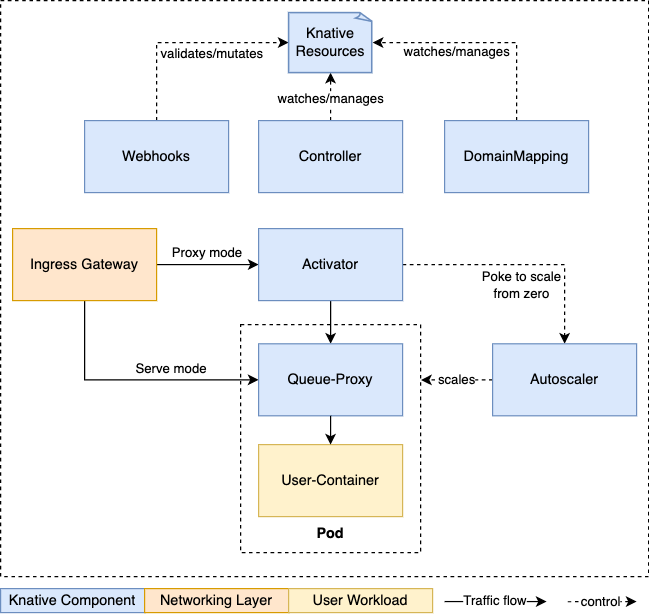
Components:-
Activator:
The activator is part of the data-plane. It is responsible to queue incoming requests (if a Knative Service is scaled-to-zero). It communicates with the autoscaler to bring scaled-to-zero Services back up and forward the queued requests. Activator can also act as a request buffer to handle traffic bursts.
Autoscaler:
The autoscaler is responsible to scale the Knative Services based on configuration, metrics and incoming requests.
Controller:
The controller manages the state of Knative resources within the cluster. It watches several objects, manages the lifecycle of dependent resources, and updates the resource state.
Queue-Proxy:
The Queue-Proxy is a sidecar container in the Knative Service’s Pod. It is responsible to collect metrics and enforcing the desired concurrency when forwarding requests to the user’s container. It can also act as a queue if necessary, similar to the Activator.
Webhooks:
Knative Serving has several webhooks responsible to validate and mutate Knative Resources.
Networking Layer & Ingress
Knative Serving depends on a Networking Layer that fulfils the Knative Networking reqirements.
Ingressin this case, does not refer to the Kubernetes Ingress Resource. It refers to the concept of exposing external access to a resource on the cluster.
Currently, three networking layers are available
a). kourier
b). contour
c). istio
-
Each networking layer has a controller that is responsible to watch the
KIngressresources and configure theIngress Gatewayaccordingly. It will also report backstatusinformation through this resource. -
The
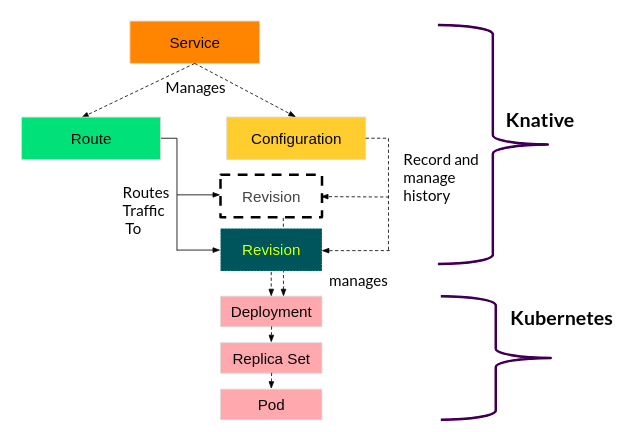
Ingress Gatewayis used to route requests to theactivatoror directly to a Knative Service Pod, depending on the mode. TheIngress Gatewayis handling requests from inside the cluster and from outside the cluster. -
For the
Ingress Gatewayto be reachable outside the cluster, it must be exposed using a Kubernetes Service of type:LoadBalanceror type:NodePort.
Demo
Use a YAML-based installation to install a production ready deployment
OR
Use the Knative Operator to install and configure a production-ready deployment.
kubectl get pods -n knative-serving
Example Output
NAME                                      READY   STATUS    RESTARTS   AGE
activator-fd687d67-sgd9m                  1/1     Running   0          67m
autoscaler-6b8db7c449-k9zj6               1/1     Running   0          67m
controller-775f8576cc-7sldf               1/1     Running   0          67m
net-kourier-controller-69db6f665f-s7vpf   1/1     Running   0          17m
webhook-694c5d68b7-rw6hv                  1/1     Running   0          67m
Deploy a service
Service-1
apiVersion: serving.knative.dev/v1
kind: Service
metadata:
  name: demo
spec:
  template:
    metadata:
      name: demo-v1
    spec:
      containers:
        - image: nginx
          ports:
            - containerPort: 80
kubectl apply -f service1.yaml
kubectl get services,routes,configuration
Service-2
apiVersion: serving.knative.dev/v1
kind: Service
metadata:
  name: demo
spec:
  template:
    metadata:
      name: demo-v2
    spec:
      containers:
        - image: httpd
          ports:
            - containerPort: 80
  traffic:
  - latestRevision: true
    percent: 50
  - revisionName: demo-v1
    percent: 50
kubectl apply -f service2.yaml
kubectl get services,routes,configuration
Managing Services with Knative CLI
# Install knative cli for below commands
kn service list
kn revision list
Load Testing
Copy the route of respective service, and access it.
brew install hey
hey -c 2000 -z 30s http://demo.default.3.211.127.113.sslip.io
Knative automatically scales services down to zero when no traffic is detected. As soon as a request is received, the service scales back up.