Grafana Loki

Loki is a horizontally-scalable, highly-available, multi-tenant log aggregation system inspired by Prometheus. Loki differs from Prometheus by focusing on logs instead of metrics, and collecting logs via push, instead of pull.
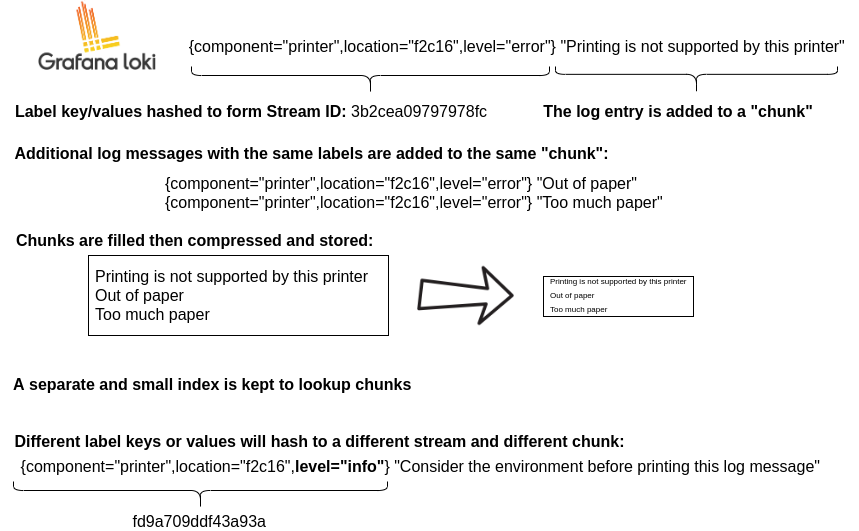
Loki does not index the contents of the logs, but only indexes metadata about your logs as a set of labels for each log stream.
- A log stream is a set of logs which share the same labels.
- Log data is then compressed and stored in chunks in an object store such as Amazon Simple Storage Service (S3) or Google Cloud Storage (GCS), or even, for development or proof of concept, on the filesystem.
Loki features
-
Scalability - Loki is designed for scalability, and can scale from as small as running on a Raspberry Pi to ingesting petabytes a day.
-
Multi-tenancy - Loki allows multiple tenants to share a single Loki instance. With multi-tenancy, the data and requests of each tenant is completely isolated from the others. Multi-tenancy is configured by assigning a tenant ID in the agent.
-
Efficient storage - Loki stores log data in highly compressed chunks. Similarly, the Loki index, because it indexes only the set of labels, is significantly smaller than other log aggregation tools.
-
LogQL, the Loki query language - LogQL is the query language for Loki. Users who are already familiar with the Prometheus query language, PromQL, will find LogQL familiar and flexible for generating queries against the logs.
-
Alerting - Loki includes a component called the ruler, which can continually evaluate queries against your logs, and perform an action based on the result.
-
Grafana integration - Loki integrates with Grafana, Mimir, and Tempo, providing a complete observability stack, and seamless correlation between logs, metrics and traces.
Loki architecture
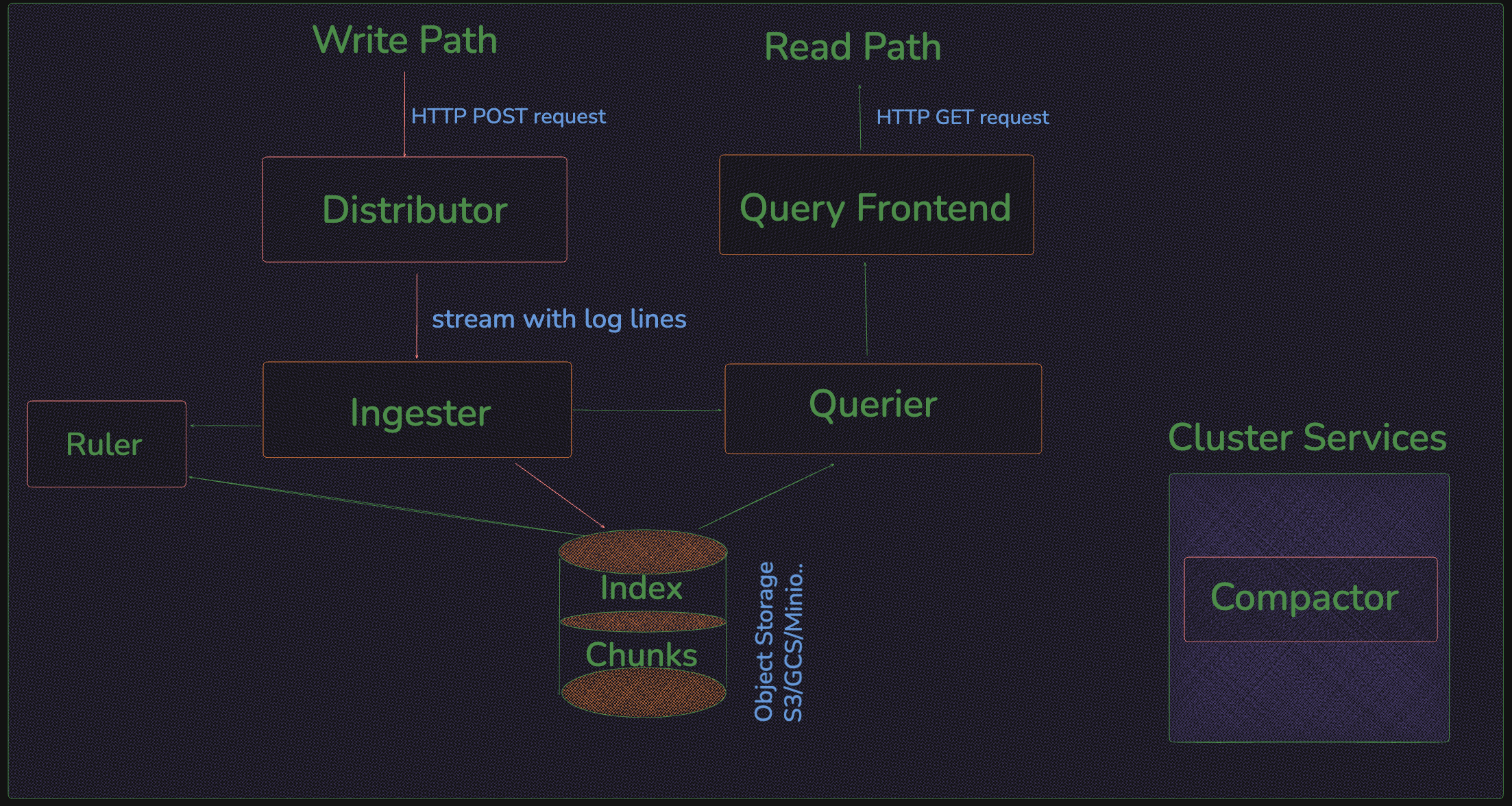
Grafana Loki has a microservices-based architecture and is designed to run as a horizontally scalable, distributed system. The system has multiple components that can run separately and in parallel.
Storage
Loki stores all data in a single object storage backend, such as Amazon Simple Storage Service (S3), Google Cloud Storage (GCS), Azure Blob Storage, among others. This mode uses an adapter called index shipper (or short shipper) to store index (TSDB or BoltDB) files the same way we store chunk files in object storage.
Data format
Grafana Loki has two main file types: index and chunks.
- The
indexis a table of contents of where to find logs for a specific set of labels. - The
chunkis a container for log entries for a specific set of labels.
Index:- Metadata on logs, key-value pairs related to the logs, the labels related to the logs. chunk:- Actual content of the logs (log message) will be stored in chunks.
Write path
High level overview, how the write path in Loki works:
- The distributor receives an HTTP POST request with streams and log lines.
- The distributor hashes each stream contained in the request so it can determine the ingester instance to which it needs to be sent based on the information from the consistent hash ring.
- The distributor sends each stream to the appropriate ingester and its replicas (based on the configured replication factor).
- The ingester receives the stream with log lines and creates a chunk or appends to an existing chunk for the stream’s data. A chunk is unique per tenant and per label set.
- The ingester acknowledges the write.
- The distributor waits for a majority (quorum) of the ingesters to acknowledge their writes.
- The distributor responds with a success (2xx status code) in case it received at least a quorum of acknowledged writes. or with an error (4xx or 5xx status code) in case write operations failed.
Read path
High level overview, how the read path in Loki works:
- The query frontend receives an HTTP GET request with a LogQL query.
- The query frontend splits the query into sub-queries and passes them to the query scheduler.
- The querier pulls sub-queries from the scheduler.
- The querier passes the query to all ingesters for in-memory data.
- The ingesters return in-memory data matching the query, if any.
- The querier lazily loads data from the backing store and runs the query against it if ingesters returned no or insufficient data.
- The querier iterates over all received data and deduplicates, returning the result of the sub-query to the query frontend.
- The query frontend waits for all sub-queries of a query to be finished and returned by the queriers.
- The query frontend merges the indvidual results into a final result and return it to the client.
Loki components
Lets read about all the components one by one which are part of Loki Architecture.
1. Distributor
This is the first component/step in log data. Distributor service is responsible for handling incoming http post requests from clients. Once the distributor receives a set of streams, each stream is validated for correctness and to ensure that it is within the configured tenant (or global) limits. Each valid stream is then send to n ingesters in parallel. where n is the number of replican factor for storing data. The distributor determines the ingesters to which it sends a stream to using consistent hashing.
A load balancer must sit in front of the distributor to properly balance incoming traffic to them.
Distributor is a stateless component. This makes it easy to scale and offload as much work as possible from the ingesters.
Validation:-
- The first step the distributor takes is to ensure that all incoming data is according to specification.
- It includes things like checking that the labels are valid Prometheus labels.
- Also ensuring the timestamps aren’t too old or too new.
- The log lines aren’t too long.
Preprocessing:-
- Currently, the only way the distributor mutates incoming data is by normalizing labels.
e.g.
{foo="bar", bazz="buzz"}equivalent to{bazz="buzz", foo="bar"}
Rate limiting:-
- Distributor can also
rate-limitincoming logs based on the maximum data ingest rate per tenant. - e.g. Say we have
10 distributorsandtenant Ahas a10MBrate limit. Each distributor will allow up to 1MB/s before limiting. Now, say another large tenant joins the cluster and we need tospin up 10 more distributors. Now 20 distributors will adjust their rate limits for tenant A to (10MB / 20 distributors) = 500KB/s.
Forwarding:-
- Once the distributor has performed all of its validations, then it forwars the data to ingester, which ultimately responsible for acknowledging write operation.
Replication factor:-
- In order to mitigate the chance of losing data on any single ingester, the distributor will forward writes to a
replication factorof them. - Replication allows for ingester restarts and rollouts without failing writes and adds additional protection from data loss for some scenarios.
- For each label set (called a stream) that is pushed to a distributor, it will hash the labels and use the resulting value to look up replication_factor ingesters in the ring (which is a subcomponent that exposes a distributed hash table). It will then try to write the same data to all of them. This will generate an error if less than a quorum of writes succeeds.
- For
replication_factorof 3, we require thattwo writes succeed. If less than two writes succeed, the distributor returns anerrorand the write operation will beretried.
The replication factor is not the only thing that prevents data loss, though, and its main purpose is to allow writes to continue uninterrupted during rollouts and restarts. The
ingester componentnow includes awrite ahead log(WAL) which persists incoming writes to disk to ensures they are not lost as long as the disk isn’t corrupted. The complementary nature of the replication factor and WAL ensures data isn’t lost unless there are significant failures in both mechanisms (that is, multiple ingesters die and lose/corrupt their disks).
Quorum consistency:-
- Since all
distributorsshare access to the same hash ring, write requests can be sent to any distributor.
2. Ingester
The ingester service is responsible for persisting data and shipping it to long-term storage (S3, GCS, Azure Blob Storage, etc.) And it can also return the recently ingested logs data which is in-memory for queries on the read path.
Ingesters contain a lifecycler which manages the lifecycle of an ingester in the hash ring. Each ingester has a state of either PENDING, JOINING, ACTIVE, LEAVING, or UNHEALTHY:
-
PENDING:- is an Ingester’s state when it is waiting for a Handoff from another ingester
-
JOINING:- is an Ingester’s state when it is currently inserting its tokens into the ring and initializing itself. It may receive write requests for tokens it owns.
-
ACTIVE:- is an Ingester’s state when it is fully initialized. It may receive both write and read requests for tokens it owns.
-
LEAVING:- is an Ingester’s state when it is shutting down. It may receive read requests for data it still has in memory.
-
UNHEALTHY:- is an Ingester’s state when it has failed to heartbeat. UNHEALTHY is set by the distributor when it periodically checks the ring.
Chunks are compressed and marked as read-only when:
- The current chunk has reached capacity (a configurable value).
- Too much time has passed without the current chunk being updated
- A flush occurs.
Whenever a chunk is compressed and marked as read-only, a writable chunk takes its place.
When a flush occurs to a persistent storage provider, the chunk is hashed based on its tenant, labels, and contents. This means that multiple ingesters with the same copy of data will not write the same data to the backing store twice, but if any write failed to one of the replicas, multiple differing chunk objects will be created in the backing store.
Handoff
Handoff is deprecated behavior mainly used in stateless deployments of ingesters, which is discouraged. Instead, it’s recommended using a stateful deployment model together with the write ahead log.
By default, when an ingester is shutting down and tries to leave the hash ring, it will wait to see if a new ingester tries to enter before flushing and will try to initiate a handoff. The handoff will transfer all of the tokens and in-memory chunks owned by the leaving ingester to the new ingester.
Before joining the hash ring, ingesters will wait in PENDING state for a handoff to occur. After a configurable timeout, ingesters in the PENDING state that have not received a transfer will join the ring normally, inserting a new set of tokens.
3. Query frontend
The query frontend is an optional service providing the querier’s API endpoints and can be used to accelerate the read path. When the query frontend is in place, incoming query requests should be directed to the query frontend instead of the queriers. The querier service will be still required within the cluster, in order to execute the actual queries.
The query frontend internally performs some query adjustments and holds queries in an internal queue.
Queriers need to be configured with the query frontend address (via the -querier.frontend-address CLI flag) in order to allow them to connect to the query frontends.
Query frontends are stateless. However, due to how the internal queue works, it’s recommended to run a few query frontend replicas to reap the benefit of fair scheduling. Two replicas should suffice in most cases.
Queueing
If no separate query scheduler component is used, the query frontend will also perform basic query queueing.
- Ensure that large queries, that could cause an out-of-memory (OOM) error in the querier, will be retried on failure.
- Prevent multiple large requests from being convoyed on a single querier by distributing them across all queriers using a first-in/first-out queue (FIFO).
Splitting
The query frontend splits larger queries into multiple smaller queries, executing these queries in parallel on downstream queriers and stitching the results back together again. This prevents large queries from causing out of memory issues in a single querier and helps to execute them faster.
Query scheduler
The query scheduler is an optional service providing more advanced queuing functionality than the query frontend.
The queriers that connect to the query scheduler act as workers that pull their jobs from the queue, execute them, and return them to the query frontend for aggregation. Queriers therefore need to be configured with the query scheduler address (via the -querier.scheduler-address CLI flag) in order to allow them to connect to the query scheduler.
Query schedulers are stateless. It’s recommended to run more than one replica to keep the benefit of high availability. Two replicas should suffice in most cases.
Querier
The querier service is responsible for executing the actual LogQL queries. The querier can handle HTTP requests from the client directly in (single binary mode deployment or as part of the read path in “simple scalable deployment”) or pull subqueries from the query frontend or query scheduler (in “microservice” mode).
It feteches log data from both, ingesters & long term memory(S3,Gcs etc). Querier query all ingesters for in-memory data before falling-back to the same query against the backend store.
Because of the replication factor, it is possible that the querier may receive duplicate data. To resolve this, the querier internally deduplicates data that has the same nanosecond timestamp, label set, and log message.
Compactor
The compactor service is used by “shipper stores”, such as single store TSDB or single store BoltDB, to compact the multiple index files produced by the ingesters and shipped to object storage into single index files per day and tenant. This makes index lookups more efficient.
To do so, the compactor downloads the files from object storage in a regular interval, merges them into a single one, uploads the newly created index, and cleans up the old files.
Additionally, the compactor is also responsible for log retention and log deletion.
In a Loki deployment, the compactor service is usually run as a single instance.
Ruler
The ruler service manages and evaluates rule and/or alert expressions provided in a rule configuration. The rule configuration is stored in object storage (or alternatively on local file system) and can be managed via the ruler API or directly by uploading the files to object storage.
Alternatively, the ruler can also delegate rule evaluation to the query frontend. This mode is called remote rule evaluation and is used to gain the advantages of query splitting, query sharding, and caching from the query frontend.
When running multiple rulers, they use a consistent hash ring to distribute rule groups amongst available ruler instances.
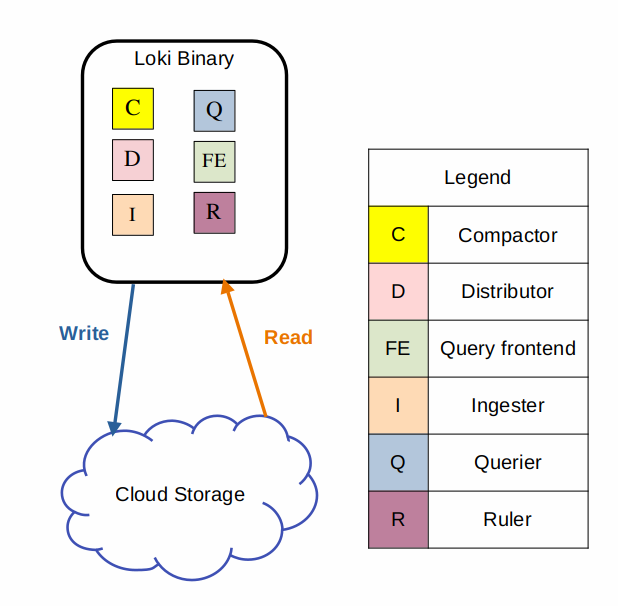
Deployment mode lets you specify how to deploy Loki.There are 3 options:
SingleBinary: Loki is deployed as a
single binary, useful for small installs typically without HA, up to a few tens of GB/day aroundapproximately 20GB/day.SimpleScalable: Loki is deployed as
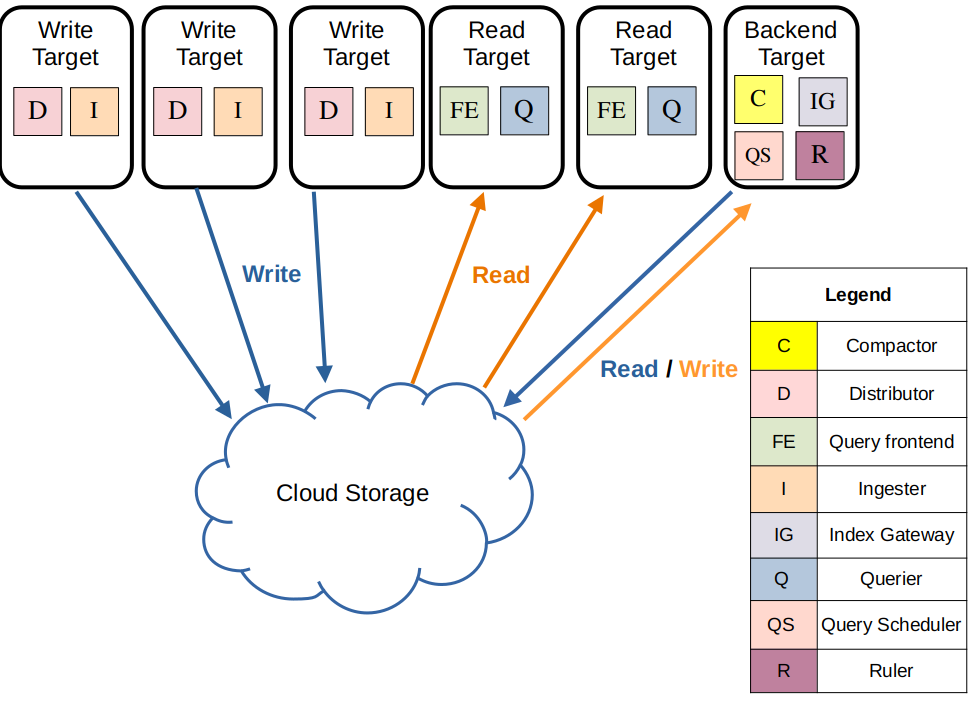
3 targets: read, write, and backend. Useful for medium installs easier to manage than distributed, up to aabout 1TB/day.Distributed: Loki is deployed as
individual microservices. The most complicated but most capable, useful for large installs, typicallyover 1TB/day.There are also 2 additional modes used for migrating between deployment modes:
- SingleBinary<->SimpleScalable: Migrate from SingleBinary to SimpleScalable (or vice versa)
- SimpleScalable<->Distributed: Migrate from SimpleScalable to Distributed (or vice versa)
SimpleScalable and Distributed REQUIRE the use of
object storage.
Monolithic mode
Install the monolithic Helm chart
Simple Scalable
-target=write
The write target is
statefuland is controlled by a Kubernetes StatefulSet. It contains the following components:
- Distributor
- Ingester
-target=read
The read target is
statelessand can be run as a Kubernetes Deployment that can be scaled automatically.
In the official helm chart it is currently deployed as a stateful set
It contains the following components:
- Query Frontend
- Querier
-target=backend
The backend target is stateful, and is controlled by a Kubernetes StatefulSet. Contains the following components:
- Compactor
- Index Gateway
- Query Scheduler
- Ruler
Install the SSD Deployment HELM
Microservices mode
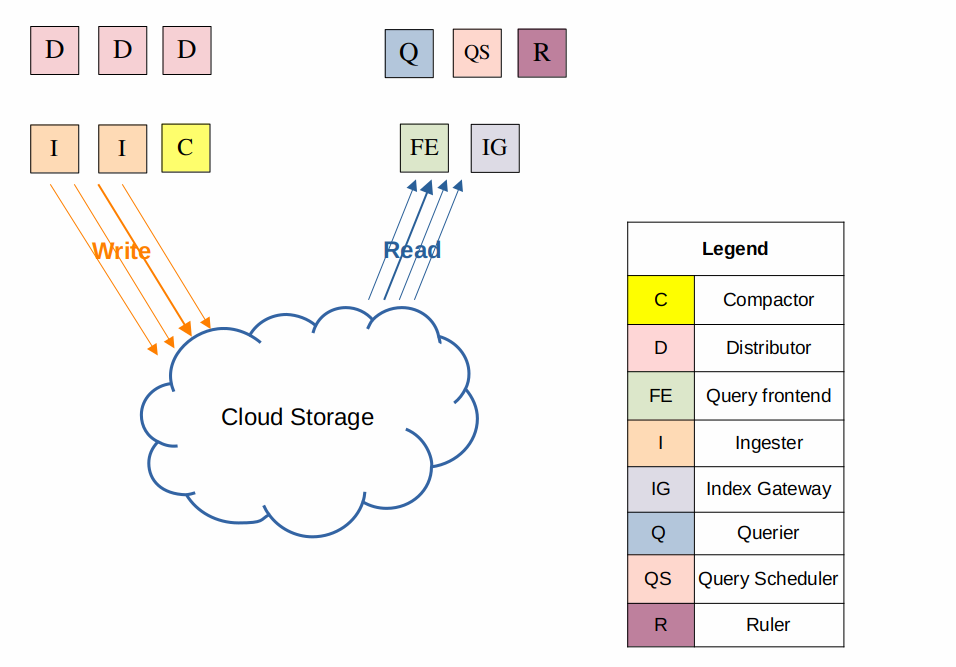
The microservices deployment mode runs components of Loki as distinct processes.
- Compactor
- Distributor
- Index Gateway
- Ingester
- Overrides Exporter
- Querier
- Query Frontend
- Query Scheduler
- Ruler
Install the Loki Distributed HELM