Install HertzBeat via Docker
Install HertzBeat via Docker
Using Docker provides a quick and simple way to start HertzBeat with a minimal setup. However, for production environments, it is recommended to deploy using Docker Compose, installation packages, or Kubernetes for better scalability and management.
Deploy HertzBeat Server
-
Run Docker Container
Execute the following command to start the HertzBeat container:
docker run -d -p 1157:1157 -p 1158:1158 \
-v $(pwd)/data:/opt/hertzbeat/data \
-v $(pwd)/logs:/opt/hertzbeat/logs \
-v $(pwd)/application.yml:/opt/hertzbeat/config/application.yml \
-v $(pwd)/sureness.yml:/opt/hertzbeat/config/sureness.yml \
--restart=always \
--name hertzbeat apache/hertzbeat
Command Parameter Explanation
-
docker run -d: Run a container in the background via Docker -p 1157:1157 -p 1158:1158: Maps container ports to host ports.1157: Web UI port.1158: Cluster communication port.
-
-v $(pwd)/data:/opt/hertzbeat/data: (optional, data persistence) Important, Mount the H2 database file to the local host, to ensure that the data is not lost due creating or deleting container. -
-v $(pwd)/logs:/opt/hertzbeat/logs: (optional) Mount the log file to the local host to facilitate viewing. -
-v $(pwd)/application.yml:/opt/hertzbeat/config/application.yml: (optional) Mount the configuration file to the container (please ensure that the file exists locally). Download -
-v $(pwd)/sureness.yml:/opt/hertzbeat/config/sureness.yml: (optional) Mount the account configuration file to the container (please ensure that the file exists locally). Download -
-v $(pwd)/ext-lib:/opt/hertzbeat/ext-lib: (optional) Mount external third-party JAR package mysql-jdbc oracle-jdbc oracle-i18n -
--name hertzbeat: (optional) Naming container name hertzbeat -
--restart=always: (optional) Configure the container to restart automatically. -
apache/hertzbeat: Use the official application mirror to start the container, if the network times out,use quay.io/tancloud/hertzbeatinstead. --network host: (optional) Use the host network mode to start Docker, namely making Docker container and hosting share network.docker run -d --network host .....
- Parameters marked as (Optional) can be omitted based on your needs.
- If the host ports (1157 or 1158) are already in use, update the command with custom port mappings.
- Ensure the files you are mounting (
application.yml,sureness.yml) exist locally.- Use
docker update --restart=always hertzbeatto set automatic restarts if you forget to add the--restart=alwaysflag.
-
Start Exploring HertzBeat
Once the container is running, open your browser and navigate to:
http://<host-ip>:1157Default credentials:
- Username:
admin - Password:
hertzbeat
- Username:
You can now explore HertzBeat’s web UI and features!
Deploy HertzBeat Collector Cluster(Optional)
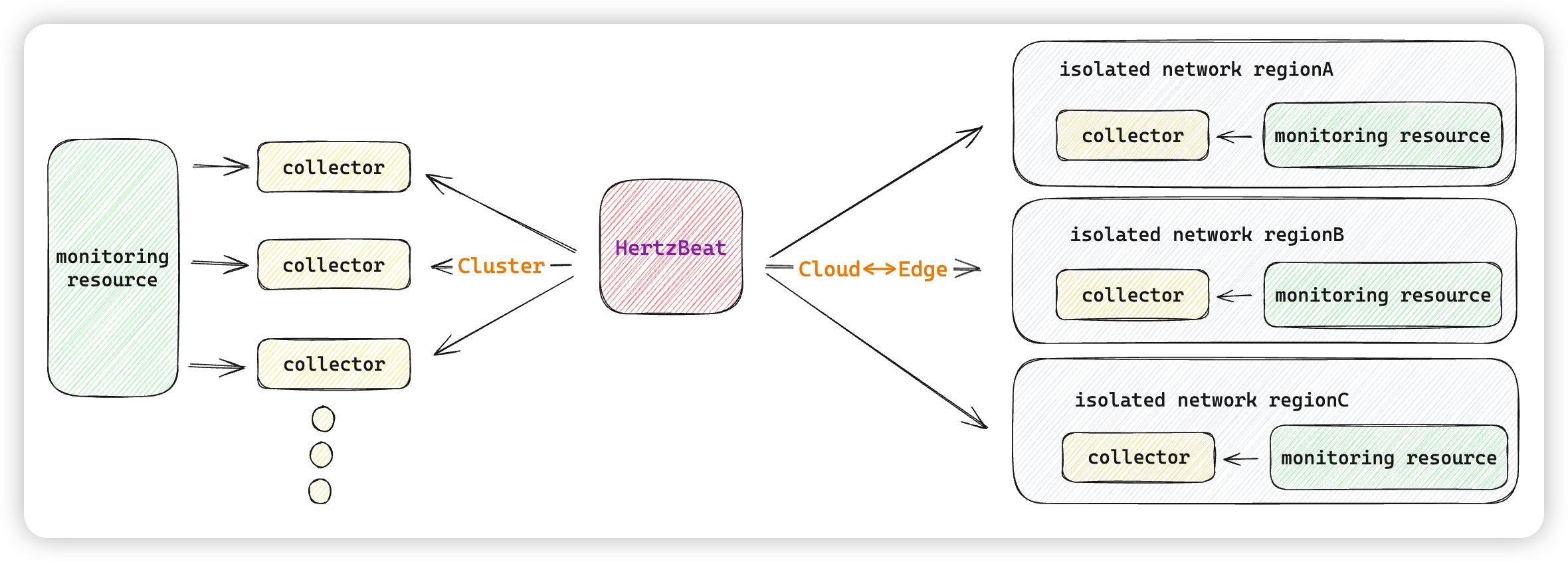
HertzBeat Collector is a lightweight data collector used to collect and send data to HertzBeat Server. By deploying multiple HertzBeat Collectors, high availability, load balancing, and cloud-edge collaboration of data can be achieved.
docker run -d \
-e IDENTITY=custom-collector-name \
-e MODE=public \
-e MANAGER_HOST=127.0.0.1 \
-e MANAGER_PORT=1158 \
--name hertzbeat-collector apache/hertzbeat-collector
Parameter Explanation
-
-e IDENTITY=custom-collector-name: Assigns a unique identifier to the collector instance. -
-e MODE=public: Sets the collector mode (public/private). Public mode allows direct data reporting. -
-e MANAGER_HOST=127.0.0.1: Specifies the HertzBeat server’s IP address. -
-e MANAGER_PORT=1158: Specifies the cluster communication port of the HertzBeat server. -
--name hertzbeat-collector: Assigns the namehertzbeat-collectorto the container.
HertzBeat Collector Cluster Overview
Deploying a collector cluster enables advanced features such as load balancing and cloud-edge data collection. Below is an architectural diagram of the HertzBeat Collector setup:
Best Practices for Production Environments
For production use, consider the following deployment methods for better scalability and reliability:
- Docker Compose: Simplifies managing multiple services and configurations.
- Installation Package Deployment: Provides direct installation for customized environments.
- Kubernetes Deployment: Ideal for dynamic, containerized environments with high availability requirements.