LangChain Models - Hands-on Coding Guide
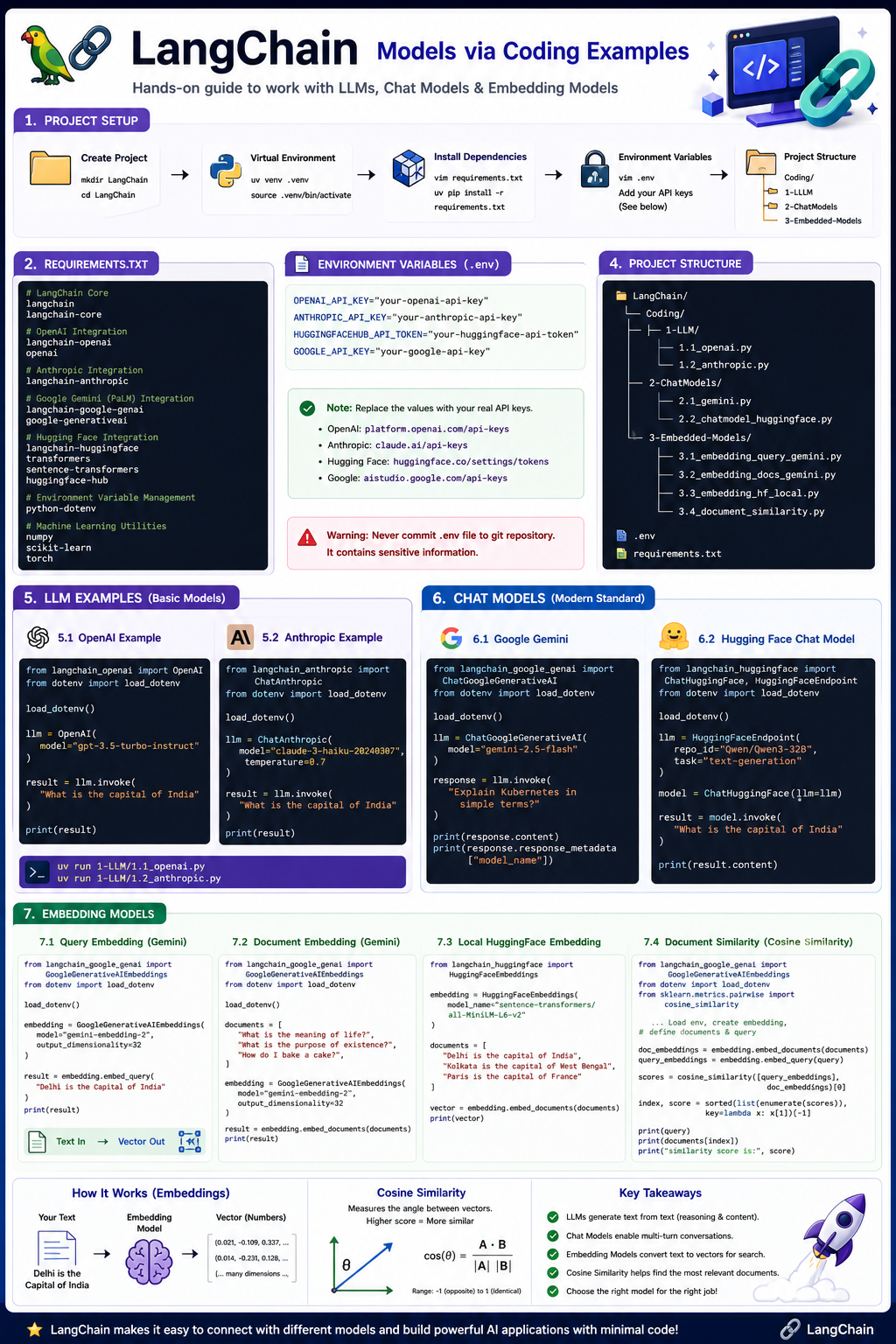
LangChain Models via coding examples
Learn LangChain by building real working examples with multiple model providers.
Create Project Structure
mkdir LangChain
cd LangChain
template-project-structure.py
from pathlib import Path
import os
import logging

# Set up basic logging for feedback
logging.basicConfig(level=logging.INFO, format='%(levelname)s: %(message)s')

project_name = "LangChain"

list_of_files = [
    f"{project_name}/requirements.txt",
    f"{project_name}/.env",
    f"{project_name}/__init__.py",
    f"{project_name}/Coding",
    f"{project_name}/Coding/1-LLM",
    f"{project_name}/Coding/2-ChatModels",
    f"{project_name}/Coding/3-Embedded-Models",
    f"{project_name}/Coding/1-LLM/1.1_openai.py",
    f"{project_name}/Coding/1-LLM/1.2_anthropic.py",
    f"{project_name}/Coding/2-ChatModels/2.1_gemini.py",
    f"{project_name}/Coding/2-ChatModels/2.2_chatmodel_huggingface.py",
    f"{project_name}/Coding/3-Embedded-Models/3.1_embedding_query_gemini.py",
    f"{project_name}/Coding/3-Embedded-Models/3.2_embedding_docs_gemini.py",
    f"{project_name}/Coding/3-Embedded-Models/3.3_embedding_hf_local.py",
    f"{project_name}/Coding/3-Embedded-Models/3.4_document_similarity.py",
]

for filepath in list_of_files:
    full_path = Path(project_name) / filepath if not filepath.startswith(project_name) else Path(filepath)

    # 1. Split the path into directory and filename
    filedir = full_path.parent
    filename = full_path.name

    # 2. Create directories if they don't exist
    if filedir:
        os.makedirs(filedir, exist_ok=True)
        # logging.debug(f"Created directory structure: {filedir}")

    # 3. Create file if it doesn't exist or is empty
    if not full_path.exists() or os.path.getsize(full_path) == 0:
        if filename != "":
            with open(full_path, "w") as f:
                if filename == '__init__.py':
                    f.write("# This file makes the directory a Python package.\n")
                elif filename == '.env':
                    f.write("# Store sensitive configurations (e.g., GOOGLE_API_KEY, OPENAI_API_KEY, ANTHROPIC_API_KEY, HUGGINGFACEHUB_API_TOKEN)\n")
                else:
                    f.write("# Initial file content.\n")
            logging.info(f"Created empty file: {full_path}")
        else:
             logging.info(f"Directory ensured: {full_path}")
    else:
        logging.info(f"File already present and non-empty: {full_path}")
python3 template-project-structure.py
Note: This is just a file structure and not code. You can modify it according to your needs.
To install uv refer https://docs.astral.sh/uv/getting-started/installation/
# Create a virtual environment named .venv
uv venv .venv

# Activate the virtual environment
source .venv/bin/activate
vim requirements.txt
requirements.txt
# LangChain Core
langchain
langchain-core

# OpenAI Integration
langchain-openai
openai

# Anthropic Integration
langchain-anthropic

# Google Gemini (PaLM) Integration
langchain-google-genai
google-generativeai

# Hugging Face Integration
langchain-huggingface
transformers
sentence-transformers
huggingface-hub

# Environment Variable Management
python-dotenv

# Machine Learning Utilities
numpy
scikit-learn
torch
Install Dependencies
uv pip install -r requirements.txt
.env
OPENAI_API_KEY="your-openai-api-key"
ANTHROPIC_API_KEY="your-anthropic-api-key"
HUGGINGFACEHUB_API_TOKEN="your-huggingface-api-token"
GOOGLE_API_KEY="your-google-api-key"
Note: This .env file is just for reference. You should replace the values with your actual API keys. You can get the API keys from the respective providers. For OpenAI API Key get it from platform.openai.com. For Anthropic API Key get it from claude.ai. For Hugging Face API Key get it from huggingface.co. For Google API Key get it from google ai studio.
Warning: Don’t commit .env file to git repository. It contains sensitive information.
1-LLM
cd 1-LLM
vim 1.1_openai.py
OpenAI Example
1.1_openai.py
from langchain_openai import OpenAI
from dotenv import load_dotenv

load_dotenv()

llm = OpenAI(model='gpt-3.5-turbo-instruct')

result = llm.invoke("What is the capital of India")

print(result)
Anthropic Example
1.2_anthropic.py
from langchain_anthropic import ChatAnthropic
from dotenv import load_dotenv

load_dotenv()

llm = ChatAnthropic(model="claude-3-haiku-20240307", temperature=0.7)

result = llm.invoke("What is the capital of India")

print(result)
Run LLM Examples
cd ..
uv run 1-LLM/1.1_openai.py
uv run 1-LLM/1.2_anthropic.py
2-ChatModels (Modern Standard)
vim 2-ChatModels/2.1_gemini.py
Google Gemini Example
2-ChatModels/2.1_gemini.py
from langchain_google_genai import ChatGoogleGenerativeAI
from dotenv import load_dotenv

load_dotenv()

# Initialize Gemini 2.5 Flash
llm = ChatGoogleGenerativeAI(model="gemini-2.5-flash")

# Invoke the model
# response = llm.invoke("What are the benefits of LangChain and Gemini?")
response = llm.invoke("Explain Kubernetes in simple terms?")
print(response.content)

print(response.response_metadata["model_name"])
Hugging Face Example
2.2_chatmodel_huggingface.py
from langchain_huggingface import ChatHuggingFace, HuggingFaceEndpoint
from dotenv import load_dotenv

load_dotenv()

llm = HuggingFaceEndpoint(
    repo_id="Qwen/Qwen3-32B",
    task="text-generation"
)

model = ChatHuggingFace(llm=llm)

result = model.invoke("What is the capital of India")

print(result.content)
Run Chat Examples
cd ..
uv run 2-ChatModels/2.1_gemini.py
uv run 2-ChatModels/2.2_chatmodel_huggingface.py
Warning: This is a simple example of how to use Gemini 2.5 Flash in LangChain. For more information, see the LangChain documentation.
3-Embedded-Models
cd 3-Embedded-Models
Query Embedding Example
3.1_embedding_query_gemini.py
from langchain_google_genai import GoogleGenerativeAIEmbeddings

from dotenv import load_dotenv

load_dotenv()

embedding = GoogleGenerativeAIEmbeddings(model="gemini-embedding-2", output_dimensionality=32)

result = embedding.embed_query("Delhi is the Capital of India")

print(str(result))
Document Embedding Example
3.2_embedding_docs_gemini.py
from langchain_google_genai import GoogleGenerativeAIEmbeddings

from dotenv import load_dotenv

load_dotenv()

documents = [
    "What is the meaning of life?",
    "What is the purpose of existence?",
    "How do I bake a cake?",
]


embedding = GoogleGenerativeAIEmbeddings(model="gemini-embedding-2", output_dimensionality=32)

result = embedding.embed_documents(documents)
print(str(result))
Hugging Face Embeddings Example (Run Locally)
3.3_embedding_hf_local.py
from langchain_huggingface import HuggingFaceEmbeddings

embedding = HuggingFaceEmbeddings(model_name="sentence-transformers/all-MiniLM-L6-v2")

documents = [
    "Delhi is the capital of India",
    "Kolkata is the capital of West Bengal",
    "Paris is the capital of France"
]

vector = embedding.embed_documents(documents)

print(str(vector))
Warning: In the above example we are running the model locally on our machine. If you don’t have good spec machine atleast 8GB RAM, good processor, 200MB disk space, then you can skip this example.
Note: Google Colab is a free service provided by Google that allows you to run code in the browser. It is a great way to experiment with different models and libraries.
Document Similarity Example
3.4_document_similarity.py
from langchain_google_genai import GoogleGenerativeAIEmbeddings
from dotenv import load_dotenv
from sklearn.metrics.pairwise import cosine_similarity

load_dotenv()

embedding = GoogleGenerativeAIEmbeddings(model="gemini-embedding-2", output_dimensionality=32)

documents = [
    "Virat Kohli is an Indian cricketer known for his aggressive batting and leadership.",
    "MS Dhoni is a former Indian captain famous for his calm demeanor and finishing skills.",
    "Sachin Tendulkar, also known as the 'God of Cricket', holds many batting records.",
    "Rohit Sharma is known for his elegant batting and record-breaking double centuries.",
    "Jasprit Bumrah is an Indian fast bowler known for his unorthodox action and yorkers."
]

query = "tell me about virat kohli"

# generate embedding
doc_embeddings = embedding.embed_documents(documents)
query_embeddings = embedding.embed_query(query)

# Semantic Search
scores = cosine_similarity([query_embeddings], doc_embeddings)[0]

# print(scores)

index, score = sorted(list(enumerate(scores)), key=lambda x:x[1])[-1]

print(query)
print(documents[index])
print("similarity score is:", score)
Run Embedding Examples
cd ..
uv run 3-Embedded-Models/3.1_embedding_query_gemini.py
uv run 3-Embedded-Models/3.2_embedding_docs_gemini.py
uv run 3-Embedded-Models/3.3_embedding_hf_local.py
uv run 3-Embedded-Models/3.4_document_similarity.py
Final Takeaway
You now understand:
- LLM Models (OpenAI, Anthropic)
- Chat Models (Gemini, HuggingFace)
- Embedding Models
- Semantic Search